lostinpadania
Members
-
Joined
-
Last visited
-
 Thank you so much for the quick response @Derek . You're really helpful! I'll be waiting for the next update.
- 7 comments
- 1 review
-
-

- 1
-
-
-
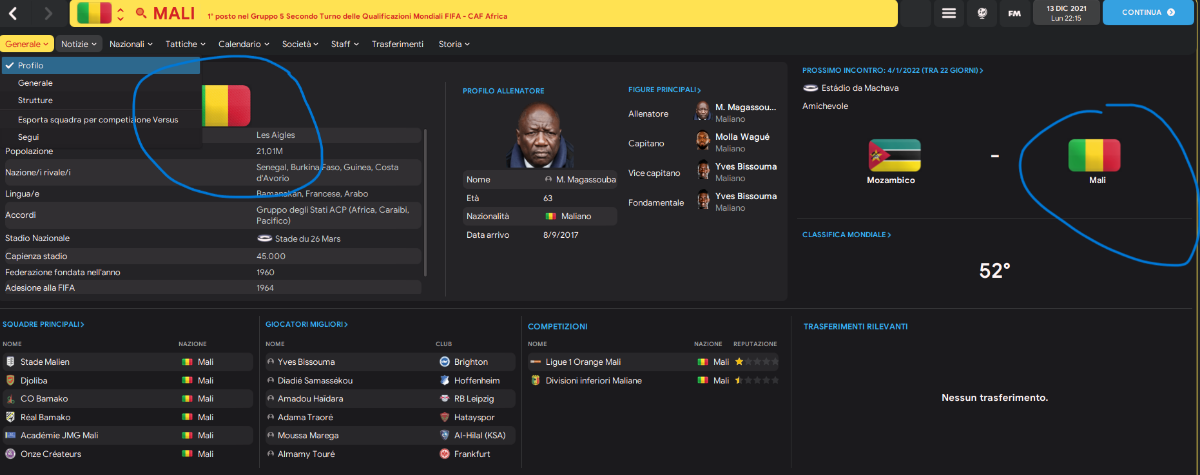
@Derekthank you so much for your complete explanation. is it also possible to see nation’s flag instead of the emblem of the federations where I circled in blue? Sorry for a bad english

-
Sensational work!!! immediately downloaded and applied. Only question: I also use the FMG Standard Logos: how can I show in the nations tab in addition to the flag also the federation crest? With this flag pack I only see the flag and no longer the federation logo
-
-
-
Hi @Derekand @TempelmanIs there a way to show the nation's coat of arms in the left panel and the national flag in the right panel instead? Once I did, but now I don't remember how to do it. Thanks again for the wonderful work, keep it up!

-
Hi @Derek !! Also would like to change the steel logos with these, but I did not understand one thing: there are 5 megapacks, 4 of 6.5gb and 1 of 1.8gb. Do I have to download them all? Seems like a lot of gb