




Jump to content
View in the app

A better way to browse. Learn more.

Football Manager Graphics

A full-screen app on your home screen with push notifications, badges and more.

To install this app on iOS and iPadOS
  1. Tap the Share icon in Safari
  2. Scroll the menu and tap Add to Home Screen.
  3. Tap Add in the top-right corner.
To install this app on Android
  1. Tap the 3-dot menu (⋮) in the top-right corner of the browser.
  2. Tap Add to Home screen or Install app.
  3. Confirm by tapping Install.

samuel schutz

Members
  • Joined

  • Last visited

  1. I liked how this new background turned out, a small but very pleasant change
  2. My friend, I'm sorry to be annoying, but I actually didn't want to give you a new suggestion, but just a question. Do you think about inserting those icons of the feet on which they play into these player icons in tactics?
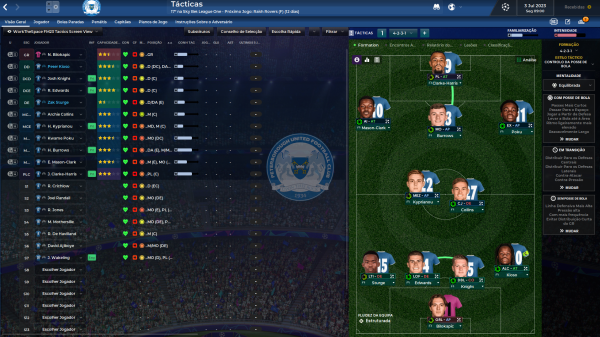
  3. wow, this redesigned screen looks really good, I liked how it turned out, I use it a lot to praise the squad at once
  4. I loved these graphics, I wanted to give you a clear suggestion if possible, you know the individual training panels when you mark more than one player? Is it possible to make a button so you can praise or criticize the player there? But of course, if possible, my friend, I really love your skin
  5. Got it, I loved how the skin is turning out, your work on it was incredible
  6. Incredible as it is turning out, a question will this graphic from the last print also be present in the Player's View?
  7. amazing, good job and I'm really looking forward to the update lol
  8. lol, how nice it turned out, do you think about updating any other panel?

Important Information

Terms & Conditions

Configure browser push notifications

Chrome (Android)
  1. Tap the lock icon next to the address bar.
  2. Tap Permissions → Notifications.
  3. Adjust your preference.
Chrome (Desktop)
  1. Click the padlock icon in the address bar.
  2. Select Site settings.
  3. Find Notifications and adjust your preference.