- Open Club
- 323 members
About This Club
This is a club for graphics researchers. Feel free to join and get involved.
Please make sure to only discuss and post logos related to men’s clubs, competitions et al.
There is a separate dedicated club for women’s logos, to which you are also welcome to contribute. Thanks!
What's new in this club
-
14 out of 20 Italian regions have been checked so far: 199 logos for new teams to be added I think I’ll finish this afternoon
-
Italian Prima Categoria Lombardia groups M and N (ID 43411827, 43411828) have been replaced by groups J and K, which need to be created https://www.tuttocampo.it/Lombardia/PrimaCategoria/GironeJ/Risultati https://www.tuttocampo.it/Lombardia/PrimaCategoria/GironeK/Risultati
-
I'll add these in mate. No unfortunately I don't have a list of the new teams.
-
Hmm, those just didn't have logos so that is what I assumed. Could you compile me a list of clubs that do not have any logo or would that be difficult?
-
9 out of 20 Italian regions have been checked so far: 130 logos for new teams to be added
-
Ok cool. @Markitos might be able to help.
-
They are not in database so they have no ID's to add
-
Feel free to add the details via a new entry mate. The teams I added were the max I could load. Once you add the entry you can approve it yourself and add the graphics.
-
Missing one new team: Cantera Adriatica Pescara - Prima Categoria Abruzzo C https://www.tuttocampo.it/Abruzzo/PrimaCategoria/GironeC/Squadra/CanteraAdriaticaPescara/936203/Scheda
-
I'll give until the end of the day guys for more submissions given I've just added the new teams. Also please submit any playable teams which are missing logos. @kenolio @AndreaSSL1900 @wfm18 @Markitos @cameosis @schweigi @John Malisianos @danisalach @ateesz @Lavegaks @Alieks @shadow @diego1960 @hlourencoam @The Newic @Thewes @NassFas @Heval @Moondog777 @spankz @douyilmaz @inohcanoss @Kriss @kristo @Scy @perpalik @Jordy94
-
I've noticed. I'm adding the ID's and logos
-
All new teams added around 15 minutes ago.
-
Logging this here, all these IDs are new and I don't see them in the graphics database yet. fm-ned-new-logos.zip
-
Please read my post above.
-
@Derek I'm trying to add a logo to the system for the Womens club of FC Groningen which is new (ID: 2000547220), but I also experience the problem of the commas. So the ID here is 2,000,547,220, which is a bit odd.
-
I'm testing something with the commas on the backend importer. Those entities will be removed today or tomorrow when I have time, so basically ignore them. On the entities/graphics, two steps are required as they are two different systems which then link together. Having just looked at the logs, I have added 99.999% of the new entities so far which means very few people are actually adding entirely new entities such as new clubs. I will be adding the new FM27 teams later today which relates to the testing I mentioned above, so hopefully this will help speed up the process of adding new FM27 teams.
-
Hi Derek, 1) Wouldn't it be faster if you could add an image directly when creating a new entry ? Since new entry go through an approval process, the entire submission could simply be rejected if necessary. Currently, it requires two separate steps (creating a new entry next adding an image). 2) https://footballmanagergraphics.com/graphics/record/263826-fc-pro-mende/ I found an entry like this in the database ID 43,156,975 ( numbers with commas ) What is this—duplicate ID 43156975 ?
-
The logo updates have now started. Any logos submitted up until this point will be included in this months updates and the new megapacks. Anything submitted from now will be included in Update 1. Thank you for all your hard work this month, it's been a great start to the new system.
-
I do understand the reasoning (particularly on this image) but I'd like to avoid the outlines where possible please. They can be added as alternatives obviously and members can choose to use them. We have to remember we make several different styles on FMG and I require the standard logo with no added outlines, gradients, added effects etc
-
FM27 Netherlands.csv It's not new clubs but here are all clubs for the Netherlands that I could load in FM27 in csv if that helps.
-
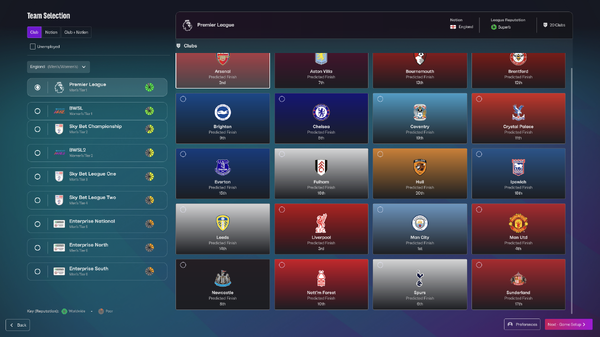
SI proved me right for 2 things. First of all, for Tottenham logo and additionally for how I work for my personal-usage, single color logos. As u can see, for the likes of Liverpool and Nottingham Forest, they use the secondary main color to create an outline, so the logo is visible under any circumstances. For example if the team has a yellow logo, and their colors are yellow and blue, the outline should be exactly that blue. What I'm doing for years now is having the main logo at 506px, and then create a 3px outline. What do u guys think?
-
The new entry needs to be approved by a staff member first and then you can add the images etc I've approved your new entry now so you can add images now.
-
OK, now I know, thanks
-
As long as you uploaded a logo using the "Submit Graphic" button, your logo will be checked and it will appear alongside the team if it's approved.
-
Why is it not possible to add an image when creating a new entry? Or did I miss something ? This must be approved by a staff member.