





.png.5375f9550529cc385f54603a7ae71cf6.png)
Esmir007
Members
-
Joined
-
Last visited
-
Esmir007 changed their profile photo
-
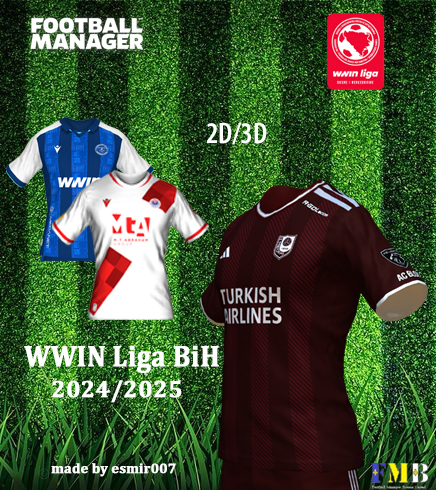 We made new jerseys for WWIN League Bosnia and Herzegovina 24/25 . These are not original jerseys, but we tried to make at least approximately 3D and 2D jerseys for all teams from WWIN League BiH. You can see pictures of the jerseys at WWIN LIGA Dresovi | FM Bosnia United. Instructions for installing Jerseys : 1. Download the selected file ( DOWNLOAD WWIN 24/25 ). 2. Open the Downloads Folder on your computer and open the WWIN 24/25 folder and unzip it to the following location: \Documents\Sports Interactive\Football Manager 2024\graphics\kits\ 3. Start Football Manager 2024 and look for the Preferences option. 4. Click on the Preferences tab and then on Advanced , and then select Interface . 5. When you open the Interface , click on Skin and then do the following: 1.Uncheck the option "Use caching to decrease page loading times" 2.Check the box next to the option “Reload skin when confirming changes in Preferences” 6.After loading the skin, the installed jerseys will be available in the game. We issue a clear ban on using images from this web portal for commercial purposes! In short, we do not want it to be commercial, and images may not be published on social networks or anywhere else without the permission of the owner of the images for which you need a license.
- 1 review
-
-

- 2
-
.thumb.png.3c62f8f7b4f008bc01df03b491eefcac.png)