Skip to content
View in the app

A better way to browse. Learn more.

Football Manager Graphics

A full-screen app on your home screen with push notifications, badges and more.

To install this app on iOS and iPadOS
  1. Tap the Share icon in Safari
  2. Scroll the menu and tap Add to Home Screen.
  3. Tap Add in the top-right corner.
To install this app on Android
  1. Tap the 3-dot menu (⋮) in the top-right corner of the browser.
  2. Tap Add to Home screen or Install app.
  3. Confirm by tapping Install.

DaveHouto

Members
  • Joined

  • Last visited

Files posted by DaveHouto

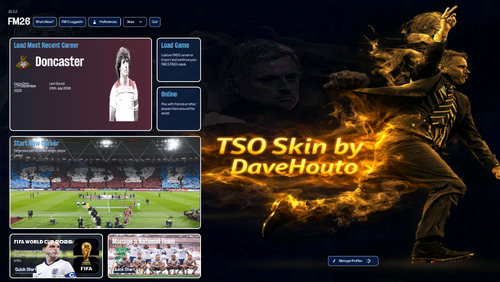
  1. TSO FM26 skin version 4.2.5 - Update 26.3 compatible
      
    Supported Platforms: Windows only
     
    I’ve gone back to a darker blue theme as this seems to be one of the best that show off the changes. A lot of the changes are due to the fantastic skinning community, see the credits section below for links to the Discord and the brilliant people that help put a new spin on the game to make the experience 1000% better. 
    Update includes:
    Updated after the 26.3 update from SI
    Colour theme change
    Matchday scoreboard moved to the left-hand side
    Matchday shirts changes to player images
    Tile changes
    Scrollable tile with buttons to change tile data
    Installation
    Extract the bundle files into your game installation folder (replace the existing files when prompted).
     
    Windows: 
    Steam: \Steam\steamapps\common\Football Manager 26\fm_Data\StreamingAssets\aa\StandaloneWindows64
    Xbox Game Pass: \XboxGames\Football Manager 26\Content\fm_Data\StreamingAssets\aa\StandaloneWindows64
    Epic: \Epic Games\Football Manager 26\fm_Data\StreamingAssets\aa\StandaloneWindows64

    macOS
    Right-click the Football Manager app → Show Package Contents.
    Then navigate to the bundles folder using a similar path structure as above (Content → Resources → Data → StreamingAssets → aa → StandaloneOSX).
    Paste and replace the supplied bundles.
     Fire up FM26 and enjoy

     
    Credits
    Everybody on the FM Skin Builder Discord to which I’m forever in debt to. These guys put a lot of effort into skinning and helping people like me put something together that hopefully brings joy to whoever uses my skin. I would like to thank the below in particular. 

    Tom 
    xxx Darkside xxx 
    Lucky Luke 
    MW90 
    Countvronsky

    Please support skinning at - https://ko-fi.com/lotsgon. 

    https://discord.com/channels/1338139048979595344/1466024246668038157 
    https://discord.com/channels/1338139048979595344/1449826223390851236
    • 120 Downloads
    • 2 Comments
    Updated

Important Information

Terms & Conditions

Account

Navigation

Search

Search

Configure browser push notifications

Chrome (Android)
  1. Tap the lock icon next to the address bar.
  2. Tap Permissions → Notifications.
  3. Adjust your preference.
Chrome (Desktop)
  1. Click the padlock icon in the address bar.
  2. Select Site settings.
  3. Find Notifications and adjust your preference.