





NassFas
Research Team
-
Joined
-
Last visited
Everything posted by NassFas
-
-
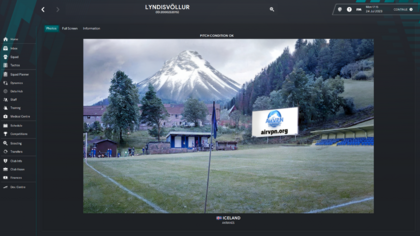
I was able to get the problem fixed by waiting a few hours, here are some screenshots of the game.
.thumb.png.6f4db59a9158f911aed2193ca6e78c4e.png)
-
@Derek It's highly probable that the font on the original logo is Lucida Grande, which used to be the default font on Mac. Just wanted to lend a bit of a hand if you do not mind.
-
Jeunesse Sportive Saint-Pierroise (improvement) - 919123 JS Sainte-Rosienne (No ID) Union Sportive Sainte-Marienne (improvement) - 34000014 Ludogorets 1945 Razgrad (improvement) - 22003969 Alt Logos without stars pfk-ludogorets-razgrad-seeklogo.com-ai.svg


-
AS_Rodos.svg


-
Florø Fotball (correct, correct colours, logo in pack is white, might be alt) - 5000210 floro-fotball.svg Ligue Professionnelle 1 Mobilis (updated) - 12015290 Ligue_1_Mobilis.svg Vodacom Ligue 1 (improvement) - 13211681 floro-fotball-seeklogo.com-cdr.svg

-
Ungmennafélagið Máni (correct, merged with Sindri but the team in the database represents the old team, Sindri is also in the affiliated clubs for Mani, logo in the pack is Sindri's) - 39038987
.thumb.png.1daf99ff213013c541ae755ac8b90e05.png)
-
Hello, I was wondering if I could trouble you with a little request for another redesign. This time it's for Ultimate Strikers Academy based in Nigeria. I would really appreciate it if you could keep most of the details the same, but could you possibly make it look a bit more polished? It would be great if you could incorporate a red football that's encircled by the text inside a white circle with a black border, and a black star on top. Thanks. The ID is 13158202.
.thumb.png.1f9166d73342d398d054cc708d70c710.png)
-
FC Bălţi (improvement, from facebook) - 2000015940 Slighly different svg version (castle colour) balti.svg Ultimate Strikers Academy (missing) - 13158202

.thumb.png.4ae2139f15eef27ff48b9802e951c633.png)
-
Just going off of sortitoutsi, you are right https://sortitoutsi.net/football-manager-2023/nation/574/commonwealth-of-soviet-states
-
RAF Lossiemouth (correct, team logo) - 1582 Västerhaninge IF (improvement) - 1838 FC Nyva Ternopil (new) - 1891 Retro FKNyvaTernopil.svg Kansas City Wizards (improvement, extinct club) - 1906 Kansas_City_Wizards_logo_(2006–10).svg Tampa Bay Mutiny (improvement, svg, extict club) - 1911 Mutiny.svg Club Nacional de Football (correct, from YouTube) - 1921


-
Heriot-Watt University (correct, logo in the pack is pre-2016, svg) - 1574 logo-footer-hw.svg
-
For FMG Flag packs, all are flags not team logos Saint-Martin (correct, svg, more info) - 917508 Réunion (alt, svg, more info) - 917510 Saint Barthélemy (alt, svg, more info) - 82082526 United Kingdom (svg, missing) - 219003 Upper Volta (svg, missing) - 13116454 West Malay (svg, missing, same as Malaysia) - 788999 Another one, not sure if this is real https://old.reddit.com/r/vexillology/comments/cnj88a/west_malaysia_flag/ Tamil Indian (svg, missing, sortitousi link) - 788990, 100349 Singh Indian (svg, missing, sortitoutsi link, same as British Raj) - 788987 SEA Chinese (svg, missing, sortitoutsi link) - 788980 Commonwealth of Soviet States (missing) - 574
-
Here is an update. I started the main save and the only problem I could find was the hashtag having two hashtags (I do not think you were supposed to put a hashtag in the editor) Then, all of a sudden, my game stopped advancing in the calendar for some reason. I don't know if this is the editor file causing this, but I also cleared cache, went on holiday, reloaded the save from another point ad it did not work. I really don't want to restart the game at this point. I will give some screenshots soon.
-
-
Kimia Farayand (correct) - 23325061 Asian/European Cup (improvement) - 150991
.thumb.png.15175a08a2ae8a6bf82018f8cb6c8bfa.png)
-
Nedbank Cup (new) - 146958 Coupe d'Algerie (correct) - 12015344 WE League Cup (missing) - 2000183629


-
Tiger Egypt Cup (correct) - 12015446
.thumb.png.533f9d8714322e7b88fec164670e10e1.png)
-
La Fiorita 1967 (correct, from facebook) - 1301129 Tre Fiori (correct, identical to the logo used on trefiori.sm) - 1301137 Tre Penne (improvement, svg) - 8800001 Tre_Penne-svg.svg Folgore Falciano (correct, very close to the worse quality logo on facebook, svg) - 1301131 folgore-falciano-serravalle-seeklogo.com-ai.svg Juvenes Dogana (improvement, svg) - 1301142 ac_juvenes-_dogana-cdr.svg Libertas (correct, from facebook) - 1301141 Domagnano (correct, identical to the logo used on facebook, svg) - 1301125 FC_Domagnano_(logo)-svg.svg Cosmos (improvement, svg) - 1301123 SS_Cosmos_(logo).svg Murata (improvement) - 1301133 Virtus Acquaviva (improvement, svg) - 1301139 VIRTUS_logo_AC-1964_2020_NO_FONT-01.svg Fiorentino (improvement, svg) - 8800000 fc-fiorentino.svg Dogana (unknown, svg) - 60008238 dogana_serravalle_old_logo That should be every club from San Marino (excluding some extinct clubs) with a high quality logo. folgore-falciano-serravalle-seeklogo.com.ai


-
Faetano (improvement, svg) - 1301127 San Marino (alt) - 792

-
Ungmennafélagið Reynir/Reynir H. for short (correct) - 2000083927

-
Gala Fairydean Rovers (alt, from website) - 61063604
-
Hiroshima Kokutaiji High School (alt) - 45089495

.thumb.png.2c0605bfe19df0d32179765e08875c87.png)

-
@Derek Hiroshima Kokutaiji High School I believe that is all the logos you posted.

.thumb.png.5cd1011dacd2bf3d33df17d20b4c0f39.png)
-
Apollon Ammochoriou




.png.703cba75131c1cfa171cdc8787848713.png)





.png.202bf8266ec3536be676d5d919647a45.png)
.png.05d0484a40cbdb3fc6a5ce3ca3f60c5e.png)

.png.98d00449fc008783a244982935c43577.png)


.png.46d80d07210328554feafe3c469d2dd4.png)


.png.e7cba4e4d3f35820e2a469c9cb06ba64.png)




.png.9f76bc7d139991e0769187f23edf0528.png)


.png.14c4c57587c60a91a051fe417859f037.png)
