Derek
Administrators
-
Joined
-
Last visited
Everything posted by Derek
-
I did a bit of work on this today and the mens logos. Everything submitted is now prepared for the updates. Were now up at 535 women's club logos and 99 competitions. 546 and 131 with alternatives. I've focused on International tournaments and finishing the remaining three leagues in the US, Japan and Australia. The likes of the women's World Cup, Copa Libertadores Femenina, Women's AFCON competition logos are all done. All playable women's leagues are complete.
-
I've logged in under your account and it works fine.
-
Thanks for the update mate.
-
Ok I've only the USA, Japan and Australia to complete tomorrow. The rest are done.
-
Yes that's what I'm doing now mate. I'm trying to use the same logos we sourced for the men's teams so that when switching between them you don't see a slightly different coloured logo. I've only five leagues to go now on the playable leagues.
-
Ok I think we can compromise on this a bit and I'll focus on the playable leagues for now. Five are done but I'll also get the rest completed tomorrow and if anyone wants to submit or work on more in the meantime just avoid the below leagues. Then I'll start improving all (1,000+ men and women) logos for the updates. The majority of the collected women's logos are not actually from the playable leagues at the moment. England – Barclays Women’s Super League England – Barclays Women’s Super League 2 Spain – Liga F Spain – Primera Federación (Femenino) France – D1 Arkema (Division 1 Féminine) Germany – Frauen-Bundesliga Italy – Serie A Femminile Sweden – Damallsvenskan Sweden – Elitettan Denmark – A-Liga Wales – Adran Premier United States – National Women’s Soccer League Japan – WE League Australia – A-League Women Edit: ALL DONE.
-
I've been going through the thread and have collected all logos that have been submitted. I'm still waiting on some logo submissions but feel there isn't enough done on the women's side for me to release the update to be honest. At the moment there are just under 400 logos including competitions which is weak. Now, without this sounding like an SI blog 😄 I'd like to delay this and release it next weekend. This will give me another week to put some work into researching womens logos and I'll delay my other projects. The issue I have is we have not just got the standard logo pack here but several styles so when I release the update the other styles will have women's leagues with 3 or 4 logos. It needs to be collected as if we have zero logos in a league. Does this make sense to everyone?
-
I don't mind mate either way.
-
I'm here if you need any help.
-
The portrait is best for FM which is why I tend to use it. Great work again.
-
That's good progress mate. Just some tips below that might help with the next steps. I've attached a file I made for Leipzig for you to look at. It's not related to the kit your making but it shows how I've structured the kit template. Try to keep the the various elements in the correct folders as this will help you down the line i.e. shoulder panels above the outline. The only layers that should be above the outline are some collars. At the bottom you should never move the FMG Kits Base folder or colour the 'shadow' layer. This will automatically change when you edit the 'Kit Colour' layer. Only edit the kit colour layer or textures in the FMG Kits Base folder. Always leave the background layer in your PSD so you can check for any unwanted pieces. You will see above the left shoulder some pieces and around the right sleeve cuff. Then you can hide it when your finished. I wouldn't use any elements of FC'12 kits or any other style with these as although they are great quality, they are much smaller in size and will look distorted. You can see that in the sponsors you used. I've also attached good quality versions for you to play around with. Just keep playing around with the style mate and it will get easier. Also check out the Generic PSD which I will try add more too next week. It has other parts you can move into whatever kit your making. RB Leipzig Third.psd


-
No problem mate. If you need any help let me know.
-
It looks as though you've used/edited one of the preview images mate. You should use the PSD file itself. Am I correct?
-
-
FMG Kits Germany Frauen-Bundesliga 2025-26 This pack contains the below number of kits. Home Kits - 14 Away Kits - 14 Third Kits - 13 Alternatives - 3 FM26 Kits Installation Guide 1) Download the pack of your choice. 2) Unzip the files using an archiver. We recommend Winrar for Windows and Keka for Mac but most applications will work. https://www.win-rar.com/start.html?&L=0 https://www.keka.io/en/ 3) Once unpacked place your pack into the folder below based on your operating system. It most likely won't be there so please create it. (lower case) Windows: \Users\<your username>\Documents\Sports Interactive\Football Manager 26\graphics\kits Mac OS: Users/YOUR MAC USERNAME/Library/Application Support/Sports Interactive/Football Manager 26/graphics/kits 4) Open Football Manager if you haven't already. If you have close and reopen it. Your kits will then appear. Kit Makers Wanted How can I get involved in creating packs? Get in touch with Derek for templates and help. https://footballmanagergraphics.com/profile/1-derek/
-
 FMG Kits Germany Frauen-Bundesliga 2025-26 This pack contains the below number of kits. Home Kits - 14 Away Kits - 14 Third Kits - 13 Alternatives - 3 FM26 Kits Installation Guide 1) Download the pack of your choice. 2) Unzip the files using an archiver. We recommend Winrar for Windows and Keka for Mac but most applications will work. https://www.win-rar.com/start.html?&L=0 https://www.keka.io/en/ 3) Once unpacked place your pack into the folder below based on your operating system. It most likely won't be there so please create it. (lower case) Windows: \Users\<your username>\Documents\Sports Interactive\Football Manager 26\graphics\kits Mac OS: Users/YOUR MAC USERNAME/Library/Application Support/Sports Interactive/Football Manager 26/graphics/kits 4) Open Football Manager if you haven't already. If you have close and reopen it. Your kits will then appear. Kit Makers Wanted How can I get involved in creating packs? Get in touch with Derek for templates and help. https://footballmanagergraphics.com/profile/1-derek/
 -
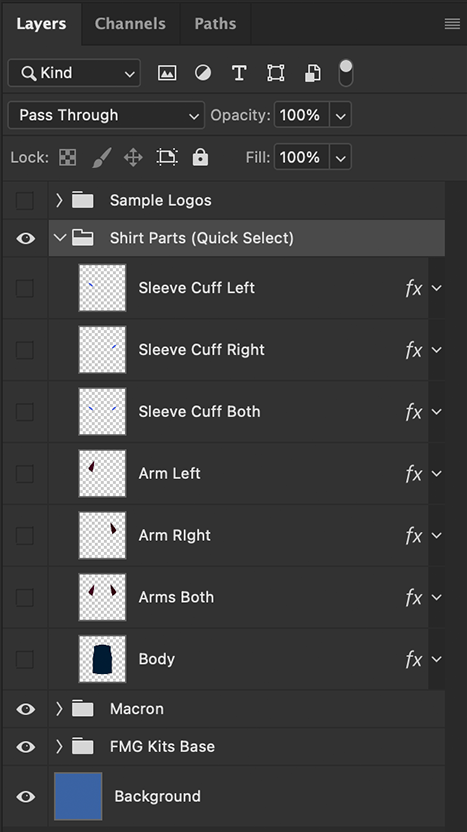
Hi mate I think this is in reference to the 'Shirt Parts (Quick Select)' layer folder which is in all templates. It's located as seen in the image below. If I've misunderstood you please quote the post and I can look at it. In terms of the new template pack, I've now finished the Frauen-Bundesliga and will start to update the pack after I complete the logo updates. So it will be in the next few days.

-
 This is the FM26 pack mate which is not compatible with FM24. Please visit the FM24 Logo section in the link below. You will see the list of styles on the right hand side and all packs are updated. https://footballmanagergraphics.com/files/category/58-football-manager-2024-logos/
- 75 comments
- 65 reviews
-
- fm25
- fm25 graphics
- fm25 logos
- fm26
-
Tagged with:
- fm25
- fm25 graphics
- fm25 logos
- fm26
- fm26 graphics
- fm26 logos
- fmg
- fmg standard logos
- fmg standard logos megapack
- fmg standard logos updates
- football manager
- football manager 2025
- football manager 2025 graphics
- football manager 2025 logos
- football manager 2026
- football manager 26
- football manager graphics
- football manager logos
-
Hi mate, Please post this in the Logo Update Thread and the researchers will verify it for the next update. The link is below and please include the ID number and name for any logos you feel can be improved or corrected. Thanks This way ensures it's not missed.
- 75 comments
- 65 reviews
-
- fm25
- fm25 graphics
- fm25 logos
- fm26
-
Tagged with:
- fm25
- fm25 graphics
- fm25 logos
- fm26
- fm26 graphics
- fm26 logos
- fmg
- fmg standard logos
- fmg standard logos megapack
- fmg standard logos updates
- football manager
- football manager 2025
- football manager 2025 graphics
- football manager 2025 logos
- football manager 2026
- football manager 26
- football manager graphics
- football manager logos
-
Hi mate, Please post this in the Logo Update Thread and the researchers will verify it for the next update. The link is below and please include the ID number and name for any logos you feel can be improved or corrected. Thanks This way ensures it's not missed.
- 75 comments
- 65 reviews
-
- fm25
- fm25 graphics
- fm25 logos
- fm26
-
Tagged with:
- fm25
- fm25 graphics
- fm25 logos
- fm26
- fm26 graphics
- fm26 logos
- fmg
- fmg standard logos
- fmg standard logos megapack
- fmg standard logos updates
- football manager
- football manager 2025
- football manager 2025 graphics
- football manager 2025 logos
- football manager 2026
- football manager 26
- football manager graphics
- football manager logos
-
Thanks mate, we all work very hard here. The FM24 packs are still available and updated from the FM24 Logo section. You will see the list of logo types on the right hand side when you click the link. https://footballmanagergraphics.com/files/category/58-football-manager-2024-logos/
- 75 comments
- 65 reviews
-
-

- 1
-
-
- fm25
- fm25 graphics
- fm25 logos
- fm26
-
Tagged with:
- fm25
- fm25 graphics
- fm25 logos
- fm26
- fm26 graphics
- fm26 logos
- fmg
- fmg standard logos
- fmg standard logos megapack
- fmg standard logos updates
- football manager
- football manager 2025
- football manager 2025 graphics
- football manager 2025 logos
- football manager 2026
- football manager 26
- football manager graphics
- football manager logos
-
In your graphics folder create three further folders and name them logos, faces and kits. Then place the relevant files in the correct folders. You mentioned two logo packs. Please use only one. Close Steam and FM26. Then reopen and they should appear.
-
 I’ve now removed them from the packs.
- 3 comments
- 2 reviews
-
- fm25
- fm25 graphics
- fm25 logos
- fm26
-
Tagged with:
- fm25
- fm25 graphics
- fm25 logos
- fm26
- fm26 graphics
- fm26 logos
- fmg
- fmg plastic logos
- fmg plastic logos megapack
- fmg plastic logos updates
- football manager
- football manager 2025 graphics
- football manager 2025 logos
- football manager 2026
- football manager 26
- football manager graphics
- football manager logos
- football manager2025
-
-