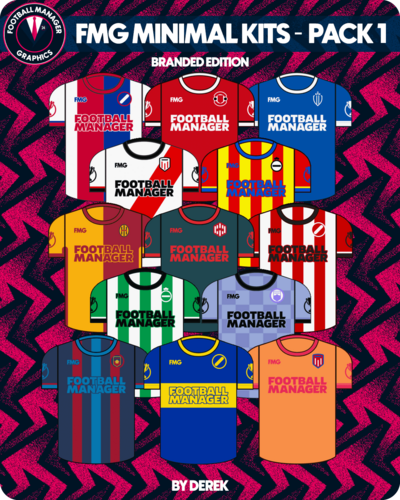
FMG Minimal Kits
A selection of minimal kits made for the Football Manager series to replace the standard default kits.
6 files
-
FMG Minimal Kits Pack 6
This pack contains two options for this style. One is minimal and the other minimal with branding.
Installation instructions
Choose which style you want to use (Minimal or Branded) and then drag and drop the 'kits' and 'logos' folders into the appropriate location below.
Windows
C:\Users\XXXX\Documents\Sports Interactive\Football Manager 2024\graphics\pictures
Mac
Users/XXXX/Library/Application Support/Sports Interactive/Football Manager 2024/graphics/pictures
Notes
If you wish to change the appearance of a kit you can do so in the FM24 Editor. This is a default pack which builds using the kit information in the editor.
Logos will only appear on kits if you have not installed a logo pack.
If you wish to use the standard default logos on these kits simply do not use the 'logos' folder included in the pack.
- 458 Downloads
- 3 Comments
Updated -
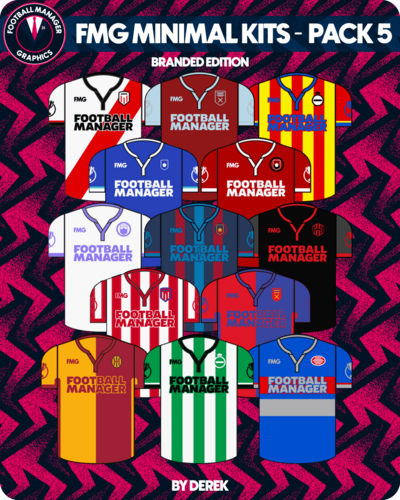
FMG Minimal Kits Pack 5
This pack contains two options for this style. One is minimal and the other minimal with branding.
Installation instructions
Choose which style you want to use (Minimal or Branded) and then drag and drop the 'kits' and 'logos' folders into the appropriate location below.
Windows
C:\Users\XXXX\Documents\Sports Interactive\Football Manager 2024\graphics\pictures
Mac
Users/XXXX/Library/Application Support/Sports Interactive/Football Manager 2024/graphics/pictures
Notes
If you wish to change the appearance of a kit you can do so in the FM24 Editor. This is a default pack which builds using the kit information in the editor.
Logos will only appear on kits if you have not installed a logo pack.
If you wish to use the standard default logos on these kits simply do not use the 'logos' folder included in the pack.
- 247 Downloads
Updated -
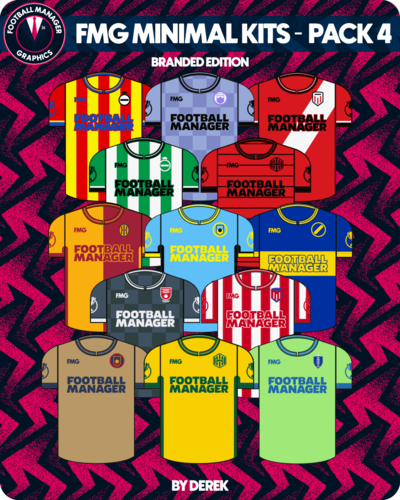
FMG Minimal Kits Pack 4
This pack contains two options for this style. One is minimal and the other minimal with branding.
Installation instructions
Choose which style you want to use (Minimal or Branded) and then drag and drop the 'kits' and 'logos' folders into the appropriate location below.
Windows
C:\Users\XXXX\Documents\Sports Interactive\Football Manager 2024\graphics\pictures
Mac
Users/XXXX/Library/Application Support/Sports Interactive/Football Manager 2024/graphics/pictures
Notes
If you wish to change the appearance of a kit you can do so in the FM24 Editor. This is a default pack which builds using the kit information in the editor.
Logos will only appear on kits if you have not installed a logo pack.
If you wish to use the standard default logos on these kits simply do not use the 'logos' folder included in the pack.
- 257 Downloads
Updated -
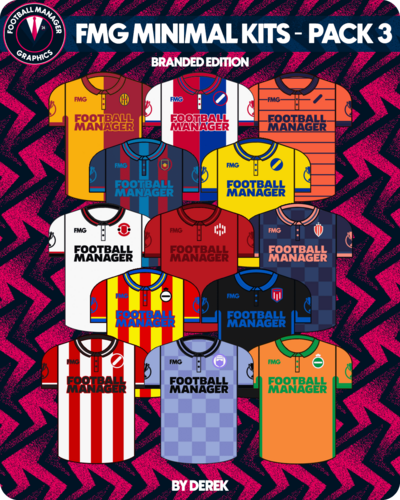
FMG Minimal Kits Pack 3
This pack contains two options for this style. One is minimal and the other minimal with branding.
Installation instructions
Choose which style you want to use (Minimal or Branded) and then drag and drop the 'kits' and 'logos' folders into the appropriate location below.
Windows
C:\Users\XXXX\Documents\Sports Interactive\Football Manager 2024\graphics\pictures
Mac
Users/XXXX/Library/Application Support/Sports Interactive/Football Manager 2024/graphics/pictures
Notes
If you wish to change the appearance of a kit you can do so in the FM24 Editor. This is a default pack which builds using the kit information in the editor.
Logos will only appear on kits if you have not installed a logo pack.
If you wish to use the standard default logos on these kits simply do not use the 'logos' folder included in the pack.
- 275 Downloads
Updated -
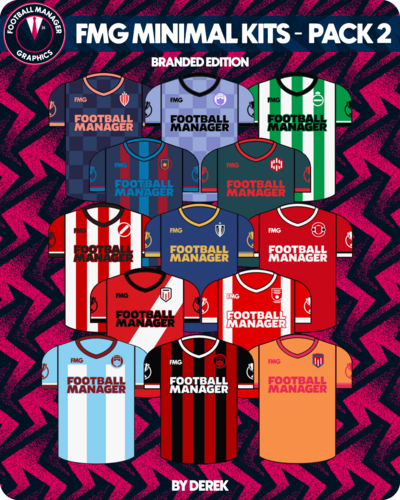
FMG Minimal Kits Pack 2
This pack contains two options for this style. One is minimal and the other minimal with branding.
Installation instructions
Choose which style you want to use (Minimal or Branded) and then drag and drop the 'kits' and 'logos' folders into the appropriate location below.
Windows
C:\Users\XXXX\Documents\Sports Interactive\Football Manager 2024\graphics\pictures
Mac
Users/XXXX/Library/Application Support/Sports Interactive/Football Manager 2024/graphics/pictures
Notes
If you wish to change the appearance of a kit you can do so in the FM24 Editor. This is a default pack which builds using the kit information in the editor.
Logos will only appear on kits if you have not installed a logo pack.
If you wish to use the standard default logos on these kits simply do not use the 'logos' folder included in the pack.
- 317 Downloads
Updated -
FMG Minimal Kits Pack 1
This pack contains two options for this style. One is minimal and the other minimal with branding.
Installation instructions
Choose which style you want to use (Minimal or Branded) and then drag and drop the 'kits' and 'logos' folders into the appropriate location below.
Windows
C:\Users\XXXX\Documents\Sports Interactive\Football Manager 2024\graphics\pictures
Mac
Users/XXXX/Library/Application Support/Sports Interactive/Football Manager 2024/graphics/pictures
Notes
If you wish to change the appearance of a kit you can do so in the FM24 Editor. This is a default pack which builds using the kit information in the editor.
Logos will only appear on kits if you have not installed a logo pack.
If you wish to use the standard default logos on these kits simply do not use the 'logos' folder included in the pack.
- 682 Downloads
- 8 Comments
Updated