






Everything posted by Derek
-
@GeorgeG I'm still working on yours mate but I just don't like anything I've made so far. It's not what I normally do but I'll do my best.
-
FC Erzgebirge Aue @wertousek
-
S'arenal @CooolMax20089
-
I've finally completed Mirage after 63 hours 🤣 Despite saying 'I'll definitely try Odyssey out next' in the previous post , I'm already onto Valhalla. I'll be working my way backwards to Odyssey, Origins etc until I can't assassinate anymore 🤣
-
That is an amazing signing for Hajduk.
-
Unfortunately the developer of the plugin has disappeared and it's become outdated. It began to cause issues on the site do I've had to disable it. I'm looking for alternatives at the moment.
-
No problem at all mate. I'll have time to complete all outstanding work by tomorrow evening.
-
Red Bull București @livius47
-
-
I don't edit AI images mate, I just make my own. If you really want to keep this I can try put I'd need the actual file rather than a screenshot please. Do you have any idea what you want in the other corner? Do I keep the ball from Sevilla and stripe design? I have to ask as everytime someone says do what you want I have to redo it. I try to avoid this to save time. 😄
-
Barnet Football Club @Rollin93
-
Montana Football Club This custom database by Football Manager Graphics sees the MLS add a 30th team in Montana Football Club. New owner James Pallotta brings in experienced Chairperson Bruce Buck and Director of Football Massimo Taibi to run the football operations while the playing side is led by Montana captain David De Gea. Key Players David De Gea Douglas Costa Mamadou Sakho Jesse Lingard Yann M'Vila Rodrigo Caio Mix Diskerud Josef Martinez This database also includes the team logo in 11 styles and kits in 4 styles. Alternative options are also available. Installation Instructions Download the custom database and extract the folder. Place the fmf file in the directory below. Sports Interactive->Football Manager 2024->editor data Place the graphics folder in the directory below. Sports Interactive->Football Manager 2024->graphics Start a new game and select database. Ensure Montana Football Club is selected. Then, select the MLS before choosing Montana Football Club from the Eastern Conference.
-
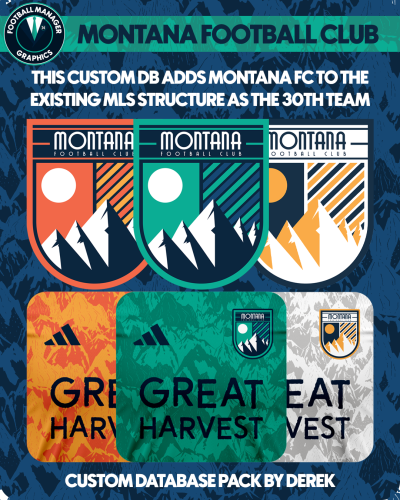 This custom database by Football Manager Graphics sees the MLS add a 30th team in Montana Football Club. New owner James Pallotta brings in experienced Chairperson Bruce Buck and Director of Football Massimo Taibi to run the football operations while the playing side is led by Montana captain David De Gea. Key Players David De Gea Douglas Costa Mamadou Sakho Jesse Lingard Yann M'Vila Rodrigo Caio Mix Diskerud Josef Martinez This database also includes the team logo in 11 styles and kits in 4 styles. Alternative options are also available. Installation Instructions Download the custom database and extract the folder. Place the fmf file in the directory below. Sports Interactive->Football Manager 2024->editor data Place the graphics folder in the directory below. Sports Interactive->Football Manager 2024->graphics Start a new game and select database. Ensure Montana Football Club is selected. Then, select the MLS before choosing Montana Football Club from the Eastern Conference.
 -
-
RCD Mallorca @CooolMax20089
-
Fantastic results with this tactic mate. I'm definitely going to give this a try with my Sampdoria save. Feel free to add this to the tactics download section 👍
-
Blackpool Football Club @Rollin93
-
-
Derek replied to Derek's topic in Creators’ Club (Logos - FMG Round Logos)'s FMG Round Logos DiscussionThis is a significant update to the template guys which you may all find helpful. FMG Round Logos Template 2024.01 Update Stripes Added Patterns Added Guides Added Segments Added
-
-
Derek replied to Derek's topic in Creators’ Club (Logos - FMG Round Logos)'s FMG Round Logos DiscussionAs more people are starting to join the project or at least showing an interest I've just put together some tips below. Start by downloading the main template which is in the templates section. I will look to create an updated version with stripes etc now that I've finished the Brazil pack. If your new to the style I would begin by making some random clubs and placing them in the thread for feedback and then work towards packs. Tips I would try to keep all logos in line with how the current logo looks as they are supposed to be simply re-imagined rather than completely redesigned. This actually makes it easier I feel as you can take the main parts required from the existing logo. However, feel free to experiment with things. If you can only find a poor quality original logo then feel free to improvise. Keep all the logos round in terms of the outer layer so that everything is uniform. Keep all your PSD files for each logo so that if a change is necessary you can make it easily without starting from nothing. If making packs, you should have logos in the following sizes 512x512, 180x180, 50x36 and 25x18. You can download a pack to check for examples. If you need help with this just ask. If making packs please also make a preview image which is included in the main template. This is used on the site when uploading but also on social media. Logos in the preview image are 300px. If a pack is too big for you to complete alone just ask for help. Some nations have many playable leagues so any help that is required is not a problem. Check the WIP list to see what's available, what's completed and what's in progress - https://footballmanagergraphics.com/fmg-round-logos-wip-list/ If you need help at any point simply post a message in here. 👍
-
Fantastic work @Dizziemachete These are great and I'd love to see more from you! Great to have another creator here 😀
-
FMG Round Logos Brazil This pack includes all playable teams for Brazil. Campeonato Brasileiro Série A Campeonato Brasileiro Série B Campeonato Brasileiro Série C Do you want to use this pack with one of our Megapacks? If you want to use this pack as well as one of our logo megapacks simply follow the instructions below. Create a 'logos' folder within your FM graphics folder Move your existing megapack into that folder and place b_ at the start of the pack name ie. FMG Standard Logos should now be b_FMG Standard Logos Then create a new folder called a_FMG Round Logos within the new logos folder. Place any FMG Round Logos packs in the a_FMG Round Logos and reload your skin. FM will now prioritise the FMG Round Logos and show the FMG Standard Logos when a logo is not available.
-
Fantastic work guys 👏
-
@The Newic @idkds



