






Derek
Administrators
-
Joined
-
Last visited
Everything posted by Derek
-
-
-
Here you go @XeDrrez
-
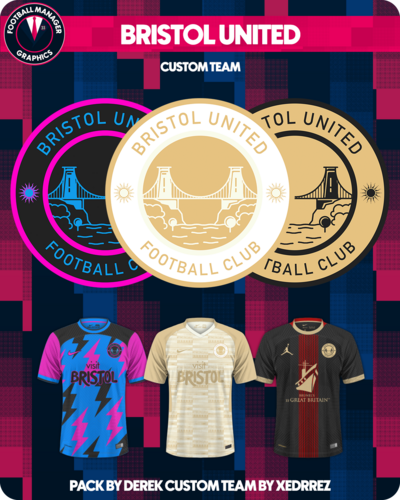 Bristol United Custom Database A custom team by @XeDrrez Pack by Derek This pack contains a custom database introducing Bristol United in the Vanarama National League South. Installation Instructions Download the custom database and extract the folder. Place the fmf file in the directory below Sports Interactive->Football Manager 2023->editor data Place the graphics folder in the directory below Sports Interactive->Football Manager 2023->graphics
 -
Can you attach the fmf file here please mate and I will create a pack?
-
Have you created your save yet mate? As in created the team and have an fmf file?
-
Bristol United Football Club @XeDrrez
-
So with FM24 information being released we got to see a new purple/orange colour scheme. Like last year I've created a custom scheme for FMG based on the FM24 colours. To try the theme out simply scroll to the bottom of the page, select theme and Football Manager 2024. 😀👍
-
Marseille/Rennes @Diaz28
-
I think it's possibly that mate and probably something got to do with the space given to that section. One of the skinning guys here might know a lot more about that then me. It's a great skin in fairness. It's strange, like I said we use the same measurements as the other kit styles with the only difference being we use nearly all the available space for the graphic with 420x420. Have you tried altering the zoom at all to see what effect it has?
-
FM24 RELEASE DATE CONFIRMED AS NOVEMBER 6TH The relentless pursuit of progress defines Football Manager 2024, which debuts globally across platforms from November 6th. Driven by a constantly evolving quest to deliver complete football authenticity, FM24 is the most complete edition in the series yet, filled with new additions that deepen your immersion and elevate your gameplay experience. FM24 Console, FM24 Touch and FM24 Mobile are also warming up for the new campaign, with all three set to launch from November 6th. NEW ADDITIONS TO THE FM LINE-UP FM24 heralds a significant milestone for the series and the wider SEGA family as it marks our official debut in Japan and the first time Japanese language will be officially supported in our games. Also joining the squad this season are Netflix, the exclusive home for FM24 Mobile. More information on FM24 Mobile and what the move to Netflix means for you is available in our dedicated announcement. FM24 Console will also be available through Xbox, Xbox Game Pass and Xbox Game Pass for PC from November 6th. Xbox Game Pass for PC subscribers will also be able to enjoy the full immersion of the desktop classic. Elsewhere, after a debut to remember earlier this year, Football Manager 2024 Console will be returning to PlayStation 5 for a second season. FM24 Touch is also returning to Nintendo Switch™ for another campaign, with further platform information to follow in the coming weeks. NEW FEATURES AND GAMEPLAY UPGRADES Initially revealed in June’s Development Update blog, the brand-new ability to transfer careers* from Football Manager 2023, FM23 Console and FM23 Touch is just one of this year’s headline developments. Further additions, including a refresh of Set Pieces and smarter transfers and finances, are heavily influenced by the ever-evolving world of football and driven by expert insight from new and existing partnerships within the professional game. In a first for the studio, FM24’s announcement trailer ends with a roadmap outlining our key feature drops and reveal dates across all platforms. Gameplay upgrades for the PC/Mac title will follow throughout the remainder of September. New features for FM24 Console and FM24 Mobile will drop during the week commencing October 23rd, with FM24 Touch’s new additions getting the spotlight at the start of November. Make sure to follow Football Manager on social media to see those drops as soon as they’re released. Sign up to FMFC, our dedicated members club, to get exclusive access to additional feature blogs. PRE-PURCHASE AND EARLY ACCESS Between September 12th and November 6th, fans who pre-purchase FM24 (for PC and Mac) and FM24 Console (Xbox and PlayStation 5**), from a SEGA-approved digital retailer will receive a 10% discount. Those pre-purchasing on PC and Mac can kick-off their managerial career ahead of schedule with Early Access to FM24***. Early Access will be available via Steam and the Epic Games Store circa two weeks prior to the official street date, and single-player careers started in that period can be carried across when the game updates for launch on November 6th. *The ability to transfer save games to FM24 Mobile is not possible at this time. **On PlayStation, this discount is only available for PlayStation Plus subscribers. ***Early Access is available from SEGA-approved digital retailers only. Please check to see if the store you’re purchasing from is participating in the offer. The Early Access version may go live at different times on different platforms.
-
-
I think that's an interesting point mate in terms of ca and pa. If I was to hazard a guess I would imagine the same system would be used but may be treated differently in terms of attributes, transfer values etc. I'm looking forward to seeing how they integrate woman's football. I think SI have missed a trick though not having this done for FM24, particularly on the back of the Woman's World Cup this year. I think timing it with this years release could have encouraged more female players of FM.
-
Thanks guys. Appreciate the work you're all putting in here. 👏
-
It's no problem mate 😀 This is a busy month for my photoshop app as I prepare the new megapacks. Whenever it is not batching logos for our new styles I will get these done. Hopefully later on this evening.
-
-
-
FMG Plastic Logos These are made with a plastic finish using a mixture of different textures and layers. FMG Plastic Logos Megapack is now complete and will include over 84,000 logos when released on October 1st. Here are some examples 🙂
-
Old Jack Pandas @PSych0P7NDa
-
I've just set photoshop to batch logos for the next 7-8 hours mate but I can do it for you once it's finished. Alternatively you can follow these steps. Let me know if you don't need me to do it. Resize to 512 pixels - automatically it should resize to 512x512 save the logo Resize to 180 pixels - automatically it should resize to 180x180 save the logo Resize the height to 36 - automatically it should be 36x36 change the canvas width to 50 pixels save the logo Resize to 25 pixels - automatically it should be 25x18 save the logo
-
0️⃣1️⃣-1️⃣0️⃣-2️⃣0️⃣2️⃣3️⃣
-
Newports Town/Isle of Wight @Rollin93
-
This blog is one that I have been looking forward to writing and we’re delighted to finally be able to update you all on the future direction of Football Manager. I’m going to talk about FM23, FM24, and in a first for us as a studio, look a bit further ahead beyond the next iteration of the game to one of the biggest changes in our history. And there’s a lot to talk about so, whilst I apologise for the length, I hope you find it an interesting insight into what we’ve been up to at the studio. FM23: OUR MOST PLAYED GAME OF ALL TIME Let’s start with FM23 which, at this stage of the game’s lifecycle, is the most played in the series’ history. Over the last few years we’ve been embracing new platforms to improve the reach of our work – which hasn’t always worked that well (may Stadia rest in peace). But, with the success of our launches on Game Pass for Xbox and PC, this year saw us bring back Football Manager Touch for Apple Arcade and launch FM23 Console on PlayStation 5. Both exceeded all expectations. Before we embraced these new types of platforms, we were getting close to 2 million players a year. With FM23, we have just this month hit a once unimaginable milestone of 5m players, and it’s still growing. The games have also gone down tremendously well with the majority of the audience – Steam reviews are at 87%, Apple Arcade at 4.6/5 and Mobile at 4.8/5 on iOS. However, we cannot ignore that some of our longer-serving players felt that FM23’s progression had not lived up to the standards and expectations we have set over the years – and to be frank, we agree. The FM23 feature set wasn’t what we’d wanted to deliver. We tried a few new processes last year, some worked, some didn’t. A few months before release we faced the reality of having to drop a few features that we’d wanted to introduce to ensure we were able to deliver a working game. While FM23 was released with some great new features and the overall quality of the game was still very high, it also contained some features which just didn't hit the mark. Also, we weren't able to add enough of the smaller features, that really add to the experience for players that go beyond the average 200-300 hours a year. So for people playing the game for the first time, or the first time for a couple of years, there was a top-quality game for them to play – but for the most hardcore of players, there were fewer new features than normal. There are lots of reasons why this happened – but at the end of the day, as the head of the studio, the responsibility lies with me. Some of the criticism of FM23 was constructive and fair, whereas some of it was both unfair and ill-informed. The only people who know what goes into making Football Manager are those of us at the studio. But we know more people than ever are interested in how our games are made, hence this blog – which is something we are committing to do more often going forward. It’s also why we’re going to talk about the next couple of years rather than just looking ahead to the next iteration of the game. But before we can discuss the long-term future of the series, we need to let you know what is coming next… FM24: THE LAST 20 YEARS REALISED, AND THE LAST OF ITS KIND Football Manager 2024 will be the 20th game in Sports Interactive’s Football Manager series, and will be the last of its kind. It’s a love letter to football and the FM series as we know it. It’s the closing of this chapter of our history. You can expect a host of improvements, big and small, both in new features and revamps to existing areas of the game. This is all thanks to ideas and feedback from within the studio, the world of football and contributions from our feature request forum. The vast majority of the team at Sports Interactive are working on FM24, with the idea that it will inarguably be the most complete version of Football Manager to date. The FM24 feature set was confirmed and fully designed earlier than previous releases, thanks to additional resource joining the studio, and huge improvements of various practices and workflows. We’re also due to be feature complete (when every feature design is implemented by the dev, art, and UI teams) earlier than before too. Crucially, this gives us more time to finesse the new features, fix known issues and catch any new ones that may crop up. That doesn’t mean though that we’re going to announce those features significantly earlier as we want to get it all working first! However, as a sneak preview, I can share progress that’s been made towards one of the most requested features from our forums over the last 20 years – and that’s the ability to transfer saved games from one version of FM to the next. From our data, we know that people play FM in a wide range of different ways. Many will play each version until the next one is released, while others may continue with previous iterations not wanting to give up on their save game. As the best "create your own story" game there is, this is both a blessing and a curse. But, thanks to many years of hard work from across the studio, I’m delighted to announce you’ll be able to bring your FM23 career into FM24 across all platforms. This means, when you first launch Football Manager 2024, you'll be given the option to continue your FM23 story, picking up exactly where you left off - powered with the new features and revamps that FM24 will introduce. And it’s not only for this year’s version of the game that this feature will be active. It’s also the plan to bring saved games from FM24 into FM25, despite the big changes coming for FM25, which I’ll talk about more shortly. This is especially good for those playing via Game Pass and Apple Arcade who, by subscribing to those platforms, would lose access to their career shortly after the new game is released. This has been unavoidable to date due to the expiry of our licenses which require us to remove titles from platforms upon conclusion. We’re still working out the finer details with the platform holders, but the idea is that you’ll be able to seamlessly move from FM23 to FM24 on those platforms and continue your save or start a new one. This won’t be the only long-time requested feature update coming to FM24, and is one of many major tech projects we have been working on as a studio, which leads me nicely onto the final part of the blog… FM25: THE NEXT CHAPTER WILL BE LIKE NOTHING BEFORE As mentioned before, FM24 will be the closing of a chapter after 20 years at the top of the management simulation league. But it is far from being the end of our story… For many years now, we have been planning the next revolution of Football Manager, something we haven’t claimed since the 3D engine first came into the series back in FM09. With the average play times we enjoy and the health of our game’s performance in the market, it's an important decision to get right. How can we bring new people to the series, whilst not alienating our existing audience? How can we cater for all the different ways that people play our games? There are a number of key projects we have been working on for some time now that we’re supremely confident will propel Football Manager forward for all of our player types. PROJECT DRAGONFLY: A DEEP DIVE INTO OUR TECHNOLOGY We last had a revamp of the graphics engine running behind our match engine in 2017. The last major update of the engine behind the wider game, such as the UI, was way earlier than that. Whilst what we did in 2017 was good for the 3D engine, some other things actually went backwards from a consumer-facing perspective. For example, we made the decision back then that the faces of Newgens would appear on the player bodies in the graphics engine, but the technology we use for that has stagnated and we’ve been a bit stuck. The rendering engine we chose to use also didn't keep pace with other engines - and nor did our own internal engine. Whilst we’ve constantly been having discussions over the years on how to improve our backend technology, back in January 2020 a small group in the team were assigned to start discussing the future more intently across the studio, to work out what to do to really push our technology forward. This became known as Project Dragonfly; a root and branch look at all the technology we use in the studio. Alongside this, we also started looking at different business models, platforms, working practices, and Games as a Service, and if and how we might tie these things together. The original plan was to deep-dive into the potential and then propel the learnings forward with the aim of a new-look Football Manager for FM22. Due to the pandemic and the impact on working practices at the studio, Project Dragonfly slowed down, mainly so we could deliver the games that we did during this time on time, which many other studios weren’t able to do. So we switched the planned revolution to FM23. We started adding to the team to not impinge on other releases and games projects in the studio to try and deliver Project Dragonfly, but in the run up to the release of FM22, we still weren’t where we needed to be to hit our FM23 deadlines. The strong recommendation from those working on the project from a design and engineering perspective was to move not to FM24, but to FM25. And that’s what we’re talking about here today. NEW CHAPTER, NEW ENGINE So, Football Manager 2025, FM25 Console and FM25 Touch will be our first Football Manager releases to use a new engine – Unity. Incredibly well-known in the gaming space, Unity powers many of the best-known games in the world, from Genshin Impact through to the Cities Skyline series. Project Dragonfly explored a number of game engine partners, but after all our research was concluded, Unity was the clear favourite to take us into an exciting new era for the series. The switch to Unity is going to give us a lot more power graphically, across all formats, alongside powerful user interface tools. We’ve been working closely with Unity over the last few years to be able to deliver a whole new UI which will dramatically improve the ways you are able to interact with the game, both inside and outside of a matchday. Unity's Universal Render Pipeline (URP) allows us to create more optimal graphics across a range of platforms, from mobile to high-end consoles and PC/Mac - but we're also adding some enhancements on top. The switch to Unity means there is the possibility of better-quality graphics across all supported devices, however it should be expected that there will be some changes to the minimum spec requirements, which will be communicated ahead of FM25’s release. For those of you who are not familiar with gaming technologies – in simple terms, FM25 will have a significantly better looking matchday experience - both on the pitch and the supporting stadium environments, alongside a vastly improved user interface that will dramatically improve how you navigate through screens and access all the information available to you as manager. We’ll also have new technology for Newgens and manager creation which are already looking really promising at this early stage. The only platform that won’t benefit from the switch to Unity in time for FM25 is FM25 Mobile, but it is absolutely our intention to incorporate the new tech in Mobile at some point in the future. A TRUER REFLECTION OF REAL-LIFE FOOTBALL WITH NEW ANIMATION TECH We’re also taking a big jump with animations, through new integrations with an exciting partner from the professional world of football. The first part of a multi-year shift will happen in FM24, so you’ll get some of the benefits in our next instalment, with a particular focus on ball physics and player locomotion. This lays the foundations for the bulk of improvements to come alongside the graphical upgrades in models, stadiums and the surrounding scenes that will be introduced in FM25 – although FM24 will still look better graphically than FM23. Simply put, the way that everything looks and moves will be far more true-to-life than ever before with FM25. This obviously requires considerable investment – but with the aforementioned growth of the studio in recent years, we now have the resource available to ensure both FM24 and FM25 are progressing simultaneously. WELCOME, WOMEN’S FOOTBALL The FM25 cycle will also see the long-awaited introduction of women’s football to the Football Manager series. Before I go into the details, I want to acknowledge that since we first announced our commitment to introduce the women’s game back in July 2021, we haven’t provided any further public updates on the project which has led to speculation and some frustration. The facts are that we’ve made really good progress in many areas, including research, the match engine and translation. But there are other areas that haven’t made enough advancements, a lot of which are legal issues. The women's game deserves to be the best it possibly can be when it is released - and the new graphics engine will help deliver that. Supporting us in bringing this project to life are some key people from inside the women’s game, who are passionate about helping us deliver the most authentic experience possible. We look forward to announcing some of those in a future development update blog. THE BIG QUESTION By this point that I’m sure that most of you are asking the same question – when can we see what this all looks like? Well, as mentioned earlier, we've had resource on FM25 for some time now, building towards a key milestone at the end of 2023. So, this means we're aiming for the first major FM25 reveal in Q2 of 2024. Until then, the updates from the studio will be informing you all about Football Manager 2024 - and you'll be hearing more about that very soon. So, to sum everything up… FM24 – Marking our 20th anniversary of Football Manager by delivering the most complete version in the series' history, across Steam, Epic, Microsoft Store, Game Pass, PS5, Xbox, Apple Arcade, Switch and iOS & Android for mobile. FM25 – For the first time in decades, a true sequel. The Unity engine will bring a new graphics engine, a fresh user interface and advanced animations, alongside the introduction of women's football (plus lots more, across platforms). Thank you, as always, for your continued support. We look forward to having you on board for many more years to come as we tackle this enormous change and raise the bar even higher in our genre. Cheers, Miles
-
New FM24 FMG Logo Megapacks Release Day Our new FMG Logo Megapacks for Football Manager 2024 will be released on this date.
-
As mentioned previously I plan to release new megapacks for FM24 on October 1st. Do do this there is a lot of work in organising, creating etc etc on my end which means I will need added time this month to have everything ready. So, I would ask that if anyone would like to include logos in the megapacks that they do so by the 23rd of this month. Anything after that will not be included until Update 1 on November 1st. Thank you. 😀


