Derek
Administrators
-
Joined
-
Last visited
Files posted by Derek
-
FMG ING Logos 2025.04
Template by @Tempelman
Pack by @Derek
Research Team
@schweigi @AndreaSSL1900 @cameosis @Markitos @ateesz @rioplworks @Kriss @NassFas @ElCheffe @diego1960 @wfm18 @kenolio @Copywriter
Pack Contents
Each pack consists of official logos which we referred to as 'Normal' logos. We offer 'Alternative' logos in each of our packs which are logos that clubs may wear as shirt logos, perhaps in different colours, anniversary editions but are all based on official logos used by that organisation.
We've also added 'Fantasy" logos to the packs which are great for future saves and 'Create-A-Club' games. In fact, all the logos created in our Design Factory are included in the megapacks. We have also got an option for the 'Retro' fans with a great selection of historic logos from many teams and competitions.
Each pack also contains our very own default minimal style for those logos we haven't yet covered. However, if you wish to stick with the original default logos from the FM series simply delete our version in the megapack and unzip 'Original Default Logos' file.
Installation Guide - FMG Monthly Logo Updates
Drag and drop the contents (including the config files) of each folder in this update pack into the corresponding folder in the megapack and replace the existing logos when prompted. Do not drag and drop the actual folders as this will overwrite your megapack.
This MUST be done for all three sizes (512x512px, 50x36px and 25x18px) or you will have issues displaying the logos in-game.
Then simply go to preferences in FM and reload your skin.
Alternative | Fantasy | Retro Logos
To use any of the alternative, fantasy or retro logos in game you must remove the text at the end of each logo i.e. alt, retro or fantasy and drag and drop into the normal logo folder in the megapack.
You will need to repeat this for all four sizes. Then simply go to preferences in FM and reload your skin.
I would advise creating a copy of the original logos before replacing them.
- 108 Downloads
Submitted -
FMG Grunge Logos 2025.04
Pack and Template by @Derek
Research Team
@schweigi @AndreaSSL1900 @cameosis @Markitos @ateesz @rioplworks @Kriss @NassFas @ElCheffe @diego1960 @wfm18 @kenolio @Copywriter
Pack Contents
Each pack consists of official logos which we referred to as 'Normal' logos. We offer 'Alternative' logos in each of our packs which are logos that clubs may wear as shirt logos, perhaps in different colours, anniversary editions but are all based on official logos used by that organisation.
We've also added 'Fantasy" logos to the packs which are great for future saves and 'Create-A-Club' games. In fact, all the logos created in our Design Factory are included in the megapacks. We have also got an option for the 'Retro' fans with a great selection of historic logos from many teams and competitions.
Each pack also contains our very own default minimal style for those logos we haven't yet covered. However, if you wish to stick with the original default logos from the FM series simply delete our version in the megapack and unzip 'Original Default Logos' file.
Installation Guide - FMG Monthly Logo Updates
Drag and drop the contents (including the config files) of each folder in this update pack into the corresponding folder in the megapack and replace the existing logos when prompted. Do not drag and drop the actual folders as this will overwrite your megapack.
This MUST be done for all three sizes (512x512px, 50x36px and 25x18px) or you will have issues displaying the logos in-game.
Then simply go to preferences in FM and reload your skin.
Alternative | Fantasy | Retro Logos
To use any of the alternative, fantasy or retro logos in game you must remove the text at the end of each logo i.e. alt, retro or fantasy and drag and drop into the normal logo folder in the megapack.
You will need to repeat this for all four sizes. Then simply go to preferences in FM and reload your skin.
I would advise creating a copy of the original logos before replacing them.
- 107 Downloads
Submitted -
This custom database by Football Manager Graphics sees West End Tigers Football Club take on the challenge of securing League Two safety while building a squad from scratch.
No players? No problem as you've got the board and supporters backing!
Installation Instructions
Download the custom database and extract the folder.
Place the fmf file in the directory below.
Sports Interactive->Football Manager 2024->editor data
Place the graphics folder in the directory below.
Sports Interactive->Football Manager 2024->graphics
Start a new game and select database. Ensure Westminster Football Club is selected.
Then, select the Premier League before choosing Westminster Football Club.
- 80 Downloads
- 1 Comments
Updated -
This custom database by Football Manager Graphics sees a young Westminster Football Club take on the challenge of securing Premier League safety and beyond.
This pack includes the custom database and graphics.
Key Players
Marc Guéhi (Captain)
Kalvin Phillips (Vice Captain)
Caoimhin Kelleher
Evan Ferguson
Kieran Tierney
Installation Instructions
Download the custom database and extract the folder.
Place the fmf file in the directory below.
Sports Interactive->Football Manager 2024->editor data
Place the graphics folder in the directory below.
Sports Interactive->Football Manager 2024->graphics
Start a new game and select database. Ensure Westminster Football Club is selected.
Then, select the Premier League before choosing Westminster Football Club.
- 138 Downloads
- 1 Comments
Submitted -
FM Mobile FMV Logos 2025.03
Template by JackHammer - Credit Murray
Pack by @Derek
Research Team
@schweigi @AndreaSSL1900 @cameosis @Markitos @Scy @ateesz @rioplworks @Kriss @NassFas @OrangePulp @douyilmaz @Snazzus
Pack Contents
Each pack consists of official logos which we referred to as 'Normal' logos. We offer 'Alternative' logos in each of our packs which are logos that clubs may wear as shirt logos, perhaps in different colours, anniversary editions but are all based on official logos used by that organisation.
We've also added 'Fantasy" logos to the packs which are great for future saves and 'Create-A-Club' games. In fact, all the logos created in our Design Factory are included in the megapacks. We have also got an option for the 'Retro' fans with a great selection of historic logos from many teams and competitions.
Each pack also contains our very own default minimal style for those logos we haven't yet covered. However, if you wish to stick with the original default logos from the FM series simply delete our version in the megapack and unzip 'Original Default Logos' file.
Installation Guide - FMG Monthly Logo Updates
Drag and drop the contents (including the config files) of each folder in this update pack into the corresponding folder in the megapack and replace the existing logos when prompted. Do not drag and drop the actual folders as this will overwrite your megapack.
Then simply go to preferences in FM and reload your skin.
Alternative | Fantasy | Retro Logos
To use any of the alternative, fantasy or retro logos in game you must remove the text at the end of each logo i.e. alt, retro or fantasy and drag and drop into the normal logo folder in the megapack.
You will need to repeat this for all sizes. Then simply go to preferences in FM and reload your skin.
I would advise creating a copy of the original logos before replacing them.
- fm25
- fmview
- fm25 logos
- fm25 graphics
-
Tagged with:
- fm25
- fmview
- fm25 logos
- fm25 graphics
- fm25 mobile
- fm25 mobile logos
- fmv
- fm25 mobile graphics
- fmg
- fm mobile
- fm mobile logos
- football manager
- football manager graphics
- football manager logos
- fm mobile graphics
- football manager 2025
- football manager 2025 logos
- fmv logos
- fmv logos megpack
- fmv logos updates
- football manager 2025 graphics
- 28 Downloads
Submitted -
FM Mobile FMG Vapour Logos 2025.03
Pack & Template by @Derek
Research Team
@schweigi @AndreaSSL1900 @cameosis @Markitos @Scy @ateesz @rioplworks @Kriss @NassFas @OrangePulp @douyilmaz @Snazzus
Pack Contents
Each pack consists of official logos which we referred to as 'Normal' logos. We offer 'Alternative' logos in each of our packs which are logos that clubs may wear as shirt logos, perhaps in different colours, anniversary editions but are all based on official logos used by that organisation.
We've also added 'Fantasy" logos to the packs which are great for future saves and 'Create-A-Club' games. In fact, all the logos created in our Design Factory are included in the megapacks. We have also got an option for the 'Retro' fans with a great selection of historic logos from many teams and competitions.
Each pack also contains our very own default minimal style for those logos we haven't yet covered. However, if you wish to stick with the original default logos from the FM series simply delete our version in the megapack and unzip 'Original Default Logos' file.
Installation Guide - FMG Monthly Logo Updates
Drag and drop the contents (including the config files) of each folder in this update pack into the corresponding folder in the megapack and replace the existing logos when prompted. Do not drag and drop the actual folders as this will overwrite your megapack.
Then simply go to preferences in FM and reload your skin.
Alternative | Fantasy | Retro Logos
To use any of the alternative, fantasy or retro logos in game you must remove the text at the end of each logo i.e. alt, retro or fantasy and drag and drop into the normal logo folder in the megapack.
You will need to repeat this for all sizes. Then simply go to preferences in FM and reload your skin.
I would advise creating a copy of the original logos before replacing them.
- fm25 logos
- fm25 graphics
- fm25 mobile
- fm25
-
Tagged with:
- fm25 logos
- fm25 graphics
- fm25 mobile
- fm25
- fm25 mobile logos
- fm25 mobile graphics
- fm mobile
- football manager
- fm mobile graphics
- football manager logos
- football manager graphics
- fm mobile logos
- fmg
- football manager 2025 logos
- football manager 2025
- football manager 2025 graphics
- fmg vapour logos megapack
- fmg vapour logos
- fmg vapour logos updates
- 10 Downloads
Submitted -
FM Mobile FMG Steel Logos 2025.03
Pack & Template by @Derek
Research Team
@schweigi @AndreaSSL1900 @cameosis @Markitos @Scy @ateesz @rioplworks @Kriss @NassFas @OrangePulp @douyilmaz @Snazzus
Pack Contents
Each pack consists of official logos which we referred to as 'Normal' logos. We offer 'Alternative' logos in each of our packs which are logos that clubs may wear as shirt logos, perhaps in different colours, anniversary editions but are all based on official logos used by that organisation.
We've also added 'Fantasy" logos to the packs which are great for future saves and 'Create-A-Club' games. In fact, all the logos created in our Design Factory are included in the megapacks. We have also got an option for the 'Retro' fans with a great selection of historic logos from many teams and competitions.
Each pack also contains our very own default minimal style for those logos we haven't yet covered. However, if you wish to stick with the original default logos from the FM series simply delete our version in the megapack and unzip 'Original Default Logos' file.
Installation Guide - FMG Monthly Logo Updates
Drag and drop the contents (including the config files) of each folder in this update pack into the corresponding folder in the megapack and replace the existing logos when prompted. Do not drag and drop the actual folders as this will overwrite your megapack.
Then simply go to preferences in FM and reload your skin.
Alternative | Fantasy | Retro Logos
To use any of the alternative, fantasy or retro logos in game you must remove the text at the end of each logo i.e. alt, retro or fantasy and drag and drop into the normal logo folder in the megapack.
You will need to repeat this for all sizes. Then simply go to preferences in FM and reload your skin.
I would advise creating a copy of the original logos before replacing them.
- fm25 graphics
- fm25 mobile
- fm25 mobile logos
- fm25 logos
-
Tagged with:
- fm25 graphics
- fm25 mobile
- fm25 mobile logos
- fm25 logos
- fm25 mobile graphics
- fm25
- fm mobile
- fm mobile logos
- fm mobile graphics
- fmg
- football manager 2025
- football manager graphics
- football manager 2025 logos
- football manager logos
- football manager
- football manager 2025 graphics
- fmg steel logos
- fmg steel logos megapack
- fmg steel logos updates
- 17 Downloads
Submitted -
FM Mobile FMG Standard Logos 2025.03
Pack & Template by @Derek
Research Team
@schweigi @AndreaSSL1900 @cameosis @Markitos @Scy @ateesz @rioplworks @Kriss @NassFas @OrangePulp @douyilmaz @Snazzus
Pack Contents
Each pack consists of official logos which we referred to as 'Normal' logos. We offer 'Alternative' logos in each of our packs which are logos that clubs may wear as shirt logos, perhaps in different colours, anniversary editions but are all based on official logos used by that organisation.
We've also added 'Fantasy" logos to the packs which are great for future saves and 'Create-A-Club' games. In fact, all the logos created in our Design Factory are included in the megapacks. We have also got an option for the 'Retro' fans with a great selection of historic logos from many teams and competitions.
Each pack also contains our very own default minimal style for those logos we haven't yet covered. However, if you wish to stick with the original default logos from the FM series simply delete our version in the megapack and unzip 'Original Default Logos' file.
Installation Guide - FMG Monthly Logo Updates
Drag and drop the contents (including the config files) of each folder in this update pack into the corresponding folder in the megapack and replace the existing logos when prompted. Do not drag and drop the actual folders as this will overwrite your megapack.
Then simply go to preferences in FM and reload your skin.
Alternative | Fantasy | Retro Logos
To use any of the alternative, fantasy or retro logos in game you must remove the text at the end of each logo i.e. alt, retro or fantasy and drag and drop into the normal logo folder in the megapack.
You will need to repeat this for all sizes. Then simply go to preferences in FM and reload your skin.
I would advise creating a copy of the original logos before replacing them.
- fm25
- fm25 logos
- fm25 graphics
- fm25 mobile
-
Tagged with:
- fm25
- fm25 logos
- fm25 graphics
- fm25 mobile
- fm25 mobile logos
- fm25 mobile graphics
- fmg
- fm mobile graphics
- fm mobile logos
- football manager
- football manager logos
- football manager graphics
- fm mobile
- football manager 2025
- football manager 2025 graphics
- fmg standard logos
- fmg standard logos updates
- football manager 2025 logos
- fmg standard logos megapack
- 95 Downloads
Submitted -
FM Mobile FMG Plastic Logos 2025.03
Pack & Template by @Derek
Research Team
@schweigi @AndreaSSL1900 @cameosis @Markitos @Scy @ateesz @rioplworks @Kriss @NassFas @OrangePulp @douyilmaz @Snazzus
Pack Contents
Each pack consists of official logos which we referred to as 'Normal' logos. We offer 'Alternative' logos in each of our packs which are logos that clubs may wear as shirt logos, perhaps in different colours, anniversary editions but are all based on official logos used by that organisation.
We've also added 'Fantasy" logos to the packs which are great for future saves and 'Create-A-Club' games. In fact, all the logos created in our Design Factory are included in the megapacks. We have also got an option for the 'Retro' fans with a great selection of historic logos from many teams and competitions.
Each pack also contains our very own default minimal style for those logos we haven't yet covered. However, if you wish to stick with the original default logos from the FM series simply delete our version in the megapack and unzip 'Original Default Logos' file.
Installation Guide - FMG Monthly Logo Updates
Drag and drop the contents (including the config files) of each folder in this update pack into the corresponding folder in the megapack and replace the existing logos when prompted. Do not drag and drop the actual folders as this will overwrite your megapack.
Then simply go to preferences in FM and reload your skin.
Alternative | Fantasy | Retro Logos
To use any of the alternative, fantasy or retro logos in game you must remove the text at the end of each logo i.e. alt, retro or fantasy and drag and drop into the normal logo folder in the megapack.
You will need to repeat this for all sizes. Then simply go to preferences in FM and reload your skin.
I would advise creating a copy of the original logos before replacing them.
- fmg
- fm25
- fm25 graphics
- fm25 mobile
-
Tagged with:
- fmg
- fm25
- fm25 graphics
- fm25 mobile
- fm25 logos
- fm25 mobile graphics
- fm25 mobile logos
- fm mobile logos
- fm mobile graphics
- football manager logos
- football manager graphics
- football manager
- football manager 2025
- fm mobile
- football manager 2025 logos
- football manager 2025 graphics
- fmg plastic logos
- fmg plastic logos megapack
- fmg plastic logos updates
- 10 Downloads
Submitted -
FM Mobile FMG Minimal Logos 2025.03
Pack & Template by @Derek
Research Team
@schweigi @AndreaSSL1900 @cameosis @Markitos @Scy @ateesz @rioplworks @Kriss @NassFas @OrangePulp @douyilmaz @Snazzus
Pack Contents
Each pack consists of official logos which we referred to as 'Normal' logos. We offer 'Alternative' logos in each of our packs which are logos that clubs may wear as shirt logos, perhaps in different colours, anniversary editions but are all based on official logos used by that organisation.
We've also added 'Fantasy" logos to the packs which are great for future saves and 'Create-A-Club' games. In fact, all the logos created in our Design Factory are included in the megapacks. We have also got an option for the 'Retro' fans with a great selection of historic logos from many teams and competitions.
Each pack also contains our very own default minimal style for those logos we haven't yet covered. However, if you wish to stick with the original default logos from the FM series simply delete our version in the megapack and unzip 'Original Default Logos' file.
Installation Guide - FMG Monthly Logo Updates
Drag and drop the contents (including the config files) of each folder in this update pack into the corresponding folder in the megapack and replace the existing logos when prompted. Do not drag and drop the actual folders as this will overwrite your megapack.
Then simply go to preferences in FM and reload your skin.
Alternative | Fantasy | Retro Logos
To use any of the alternative, fantasy or retro logos in game you must remove the text at the end of each logo i.e. alt, retro or fantasy and drag and drop into the normal logo folder in the megapack.
You will need to repeat this for all sizes. Then simply go to preferences in FM and reload your skin.
I would advise creating a copy of the original logos before replacing them.
- fm25
- fm25 logos
- fm25 graphics
- fm25 mobile
-
Tagged with:
- fm25
- fm25 logos
- fm25 graphics
- fm25 mobile
- fm25 mobile logos
- fm25 mobile graphics
- football manager
- football manager graphics
- football manager 2025
- football manager logos
- football manager 2025 logos
- football manager 2025 graphics
- fmg minimal logos
- fmg minimal logos megapack
- fmg minimal logos updates
- fmg
- 16 Downloads
Submitted -
FM Mobile FMG Logos 2025.03
Pack & Template by @Derek
Research Team
@schweigi @AndreaSSL1900 @cameosis @Markitos @Scy @ateesz @rioplworks @Kriss @NassFas @OrangePulp @douyilmaz @Snazzus
Pack Contents
Each pack consists of official logos which we referred to as 'Normal' logos. We offer 'Alternative' logos in each of our packs which are logos that clubs may wear as shirt logos, perhaps in different colours, anniversary editions but are all based on official logos used by that organisation.
We've also added 'Fantasy" logos to the packs which are great for future saves and 'Create-A-Club' games. In fact, all the logos created in our Design Factory are included in the megapacks. We have also got an option for the 'Retro' fans with a great selection of historic logos from many teams and competitions.
Each pack also contains our very own default minimal style for those logos we haven't yet covered. However, if you wish to stick with the original default logos from the FM series simply delete our version in the megapack and unzip 'Original Default Logos' file.
Installation Guide - FMG Monthly Logo Updates
Drag and drop the contents (including the config files) of each folder in this update pack into the corresponding folder in the megapack and replace the existing logos when prompted. Do not drag and drop the actual folders as this will overwrite your megapack.
Then simply go to preferences in FM and reload your skin.
Alternative | Fantasy | Retro Logos
To use any of the alternative, fantasy or retro logos in game you must remove the text at the end of each logo i.e. alt, retro or fantasy and drag and drop into the normal logo folder in the megapack.
You will need to repeat this for all sizes. Then simply go to preferences in FM and reload your skin.
I would advise creating a copy of the original logos before replacing them.
- fm25 logos
- fm25 graphics
- fm25 mobile
- fm25
-
Tagged with:
- fm25 logos
- fm25 graphics
- fm25 mobile
- fm25
- fm25 mobile graphics
- fm25 mobile logos
- fm mobile
- fm mobile logos
- fm mobile graphics
- football manager
- football manager graphics
- football manager 2025
- football manager 2025 logos
- football manager logos
- fmg
- football manager 2025 graphics
- fmg logos
- fmg logos megapack
- fmg logos updates
- 10 Downloads
Submitted -
FM Mobile FMG ING Logos 2025.03
Template by @Tempelman
Pack by @Derek
Research Team
@schweigi @AndreaSSL1900 @cameosis @Markitos @Scy @ateesz @rioplworks @Kriss @NassFas @OrangePulp @douyilmaz @Snazzus
Pack Contents
Each pack consists of official logos which we referred to as 'Normal' logos. We offer 'Alternative' logos in each of our packs which are logos that clubs may wear as shirt logos, perhaps in different colours, anniversary editions but are all based on official logos used by that organisation.
We've also added 'Fantasy" logos to the packs which are great for future saves and 'Create-A-Club' games. In fact, all the logos created in our Design Factory are included in the megapacks. We have also got an option for the 'Retro' fans with a great selection of historic logos from many teams and competitions.
Each pack also contains our very own default minimal style for those logos we haven't yet covered. However, if you wish to stick with the original default logos from the FM series simply delete our version in the megapack and unzip 'Original Default Logos' file.
Installation Guide - FMG Monthly Logo Updates
Drag and drop the contents (including the config files) of each folder in this update pack into the corresponding folder in the megapack and replace the existing logos when prompted. Do not drag and drop the actual folders as this will overwrite your megapack.
Then simply go to preferences in FM and reload your skin.
Alternative | Fantasy | Retro Logos
To use any of the alternative, fantasy or retro logos in game you must remove the text at the end of each logo i.e. alt, retro or fantasy and drag and drop into the normal logo folder in the megapack.
You will need to repeat this for all sizes. Then simply go to preferences in FM and reload your skin.
I would advise creating a copy of the original logos before replacing them.
- fm25 graphics
- fm25 logos
- fm25 mobile
- fm25 mobile logos
-
Tagged with:
- fm25 graphics
- fm25 logos
- fm25 mobile
- fm25 mobile logos
- fm25 mobile graphics
- fm25
- fm mobile
- fm mobile graphics
- football manager
- fm mobile logos
- football manager logos
- fmg
- football manager 2025
- football manager graphics
- football manager 2025 logos
- fmg ing logos
- fmg ing logos megapack
- football manager 2025 graphics
- fmg ing logos updates
- 16 Downloads
Submitted -
FM Mobile FMG Grunge Logos 2025.03
Pack and Template by @Derek
Research Team
@schweigi @AndreaSSL1900 @cameosis @Markitos @Scy @ateesz @rioplworks @Kriss @NassFas @OrangePulp @douyilmaz @Snazzus
Pack Contents
Each pack consists of official logos which we referred to as 'Normal' logos. We offer 'Alternative' logos in each of our packs which are logos that clubs may wear as shirt logos, perhaps in different colours, anniversary editions but are all based on official logos used by that organisation.
We've also added 'Fantasy" logos to the packs which are great for future saves and 'Create-A-Club' games. In fact, all the logos created in our Design Factory are included in the megapacks. We have also got an option for the 'Retro' fans with a great selection of historic logos from many teams and competitions.
Each pack also contains our very own default minimal style for those logos we haven't yet covered. However, if you wish to stick with the original default logos from the FM series simply delete our version in the megapack and unzip 'Original Default Logos' file.
Installation Guide - FMG Monthly Logo Updates
Drag and drop the contents (including the config files) of each folder in this update pack into the corresponding folder in the megapack and replace the existing logos when prompted. Do not drag and drop the actual folders as this will overwrite your megapack.
Then simply go to preferences in FM and reload your skin.
Alternative | Fantasy | Retro Logos
To use any of the alternative, fantasy or retro logos in game you must remove the text at the end of each logo i.e. alt, retro or fantasy and drag and drop into the normal logo folder in the megapack.
You will need to repeat this for all sizes. Then simply go to preferences in FM and reload your skin.
I would advise creating a copy of the original logos before replacing them.
- fmg
- fm25
- fm25 graphics
- football manager
-
Tagged with:
- fmg
- fm25
- fm25 graphics
- football manager
- football manager logos
- fm25 logos
- football manager 2025
- football manager 2025 graphics
- football manager 2025 logos
- fmg grunge logos
- fmg grunge logos megapack
- fmg grunge logos updates
- fm mobile logos
- fm25 mobile
- fm25 mobile logos
- fm25 mobile graphics
- fm mobile
- fm mobile graphics
- football manager graphics
- 13 Downloads
Submitted -
FMV Logos 2025.03
Template by JackHammer - Credit Murray
Pack by @Derek
Research Team
@schweigi @AndreaSSL1900 @cameosis @Markitos @Scy @ateesz @rioplworks @Kriss @NassFas @OrangePulp @douyilmaz @Snazzus
Pack Contents
Each pack consists of official logos which we referred to as 'Normal' logos. We offer 'Alternative' logos in each of our packs which are logos that clubs may wear as shirt logos, perhaps in different colours, anniversary editions but are all based on official logos used by that organisation.
We've also added 'Fantasy" logos to the packs which are great for future saves and 'Create-A-Club' games. In fact, all the logos created in our Design Factory are included in the megapacks. We have also got an option for the 'Retro' fans with a great selection of historic logos from many teams and competitions.
Each pack also contains our very own default minimal style for those logos we haven't yet covered. However, if you wish to stick with the original default logos from the FM series simply delete our version in the megapack and unzip 'Original Default Logos' file.
Installation Guide - FMG Monthly Logo Updates
Drag and drop the contents (including the config files) of each folder in this update pack into the corresponding folder in the megapack and replace the existing logos when prompted. Do not drag and drop the actual folders as this will overwrite your megapack.
This MUST be done for all three sizes (512x512px, 50x36px and 25x18px) or you will have issues displaying the logos in-game.
Then simply go to preferences in FM and reload your skin.
Alternative | Fantasy | Retro Logos
To use any of the alternative, fantasy or retro logos in game you must remove the text at the end of each logo i.e. alt, retro or fantasy and drag and drop into the normal logo folder in the megapack.
You will need to repeat this for all four sizes. Then simply go to preferences in FM and reload your skin.
I would advise creating a copy of the original logos before replacing them.
- 1,216 Downloads
Submitted -
FMG Vapour Logos 2025.03
Pack and Template by @Derek
Research Team
@schweigi @AndreaSSL1900 @cameosis @Markitos @Scy @ateesz @rioplworks @Kriss @NassFas @OrangePulp @douyilmaz @Snazzus
Pack Contents
Each pack consists of official logos which we referred to as 'Normal' logos. We offer 'Alternative' logos in each of our packs which are logos that clubs may wear as shirt logos, perhaps in different colours, anniversary editions but are all based on official logos used by that organisation.
We've also added 'Fantasy" logos to the packs which are great for future saves and 'Create-A-Club' games. In fact, all the logos created in our Design Factory are included in the megapacks. We have also got an option for the 'Retro' fans with a great selection of historic logos from many teams and competitions.
Each pack also contains our very own default minimal style for those logos we haven't yet covered. However, if you wish to stick with the original default logos from the FM series simply delete our version in the megapack and unzip 'Original Default Logos' file.
Installation Guide - FMG Monthly Logo Updates
Drag and drop the contents (including the config files) of each folder in this update pack into the corresponding folder in the megapack and replace the existing logos when prompted. Do not drag and drop the actual folders as this will overwrite your megapack.
This MUST be done for all three sizes (512x512px, 50x36px and 25x18px) or you will have issues displaying the logos in-game.
Then simply go to preferences in FM and reload your skin.
Alternative | Fantasy | Retro Logos
To use any of the alternative, fantasy or retro logos in game you must remove the text at the end of each logo i.e. alt, retro or fantasy and drag and drop into the normal logo folder in the megapack.
You will need to repeat this for all four sizes. Then simply go to preferences in FM and reload your skin.
I would advise creating a copy of the original logos before replacing them.
- 407 Downloads
- 1 Comments
Submitted -
FMG Steel Logos 2025.03
Pack and Template by @Derek
Research Team
@schweigi @AndreaSSL1900 @cameosis @Markitos @Scy @ateesz @rioplworks @Kriss @NassFas @OrangePulp @douyilmaz @Snazzus
Pack Contents
Each pack consists of official logos which we referred to as 'Normal' logos. We offer 'Alternative' logos in each of our packs which are logos that clubs may wear as shirt logos, perhaps in different colours, anniversary editions but are all based on official logos used by that organisation.
We've also added 'Fantasy" logos to the packs which are great for future saves and 'Create-A-Club' games. In fact, all the logos created in our Design Factory are included in the megapacks. We have also got an option for the 'Retro' fans with a great selection of historic logos from many teams and competitions.
Each pack also contains our very own default minimal style for those logos we haven't yet covered. However, if you wish to stick with the original default logos from the FM series simply delete our version in the megapack and unzip 'Original Default Logos' file.
Installation Guide - FMG Monthly Logo Updates
Drag and drop the contents (including the config files) of each folder in this update pack into the corresponding folder in the megapack and replace the existing logos when prompted. Do not drag and drop the actual folders as this will overwrite your megapack.
This MUST be done for all three sizes (512x512px, 50x36px and 25x18px) or you will have issues displaying the logos in-game.
Then simply go to preferences in FM and reload your skin.
Alternative | Fantasy | Retro Logos
To use any of the alternative, fantasy or retro logos in game you must remove the text at the end of each logo i.e. alt, retro or fantasy and drag and drop into the normal logo folder in the megapack.
You will need to repeat this for all four sizes. Then simply go to preferences in FM and reload your skin.
I would advise creating a copy of the original logos before replacing them.
- 376 Downloads
Updated -
FMG Standard Logos 2025.03
Pack and Template by @Derek
Research Team
@schweigi @AndreaSSL1900 @cameosis @Markitos @Scy @ateesz @rioplworks @Kriss @NassFas @OrangePulp @douyilmaz @Snazzus
Pack Contents
Each pack consists of official logos which we referred to as 'Normal' logos. We offer 'Alternative' logos in each of our packs which are logos that clubs may wear as shirt logos, perhaps in different colours, anniversary editions but are all based on official logos used by that organisation.
We've also added 'Fantasy" logos to the packs which are great for future saves and 'Create-A-Club' games. In fact, all the logos created in our Design Factory are included in the megapacks. We have also got an option for the 'Retro' fans with a great selection of historic logos from many teams and competitions.
Each pack also contains our very own default minimal style for those logos we haven't yet covered. However, if you wish to stick with the original default logos from the FM series simply delete our version in the megapack and unzip 'Original Default Logos' file.
Installation Guide - FMG Monthly Logo Updates
Drag and drop the contents (including the config files) of each folder in this update pack into the corresponding folder in the megapack and replace the existing logos when prompted. Do not drag and drop the actual folders as this will overwrite your megapack.
This MUST be done for all three sizes (512x512px, 50x36px and 25x18px) or you will have issues displaying the logos in-game.
Then simply go to preferences in FM and reload your skin.
Alternative | Fantasy | Retro Logos
To use any of the alternative, fantasy or retro logos in game you must remove the text at the end of each logo i.e. alt, retro or fantasy and drag and drop into the normal logo folder in the megapack.
You will need to repeat this for all four sizes. Then simply go to preferences in FM and reload your skin.
I would advise creating a copy of the original logos before replacing them.
- 18,729 Downloads
Submitted -
FMG Plastic Logos 2025.03
Pack and Template by @Derek
Research Team
@schweigi @AndreaSSL1900 @cameosis @Markitos @Scy @ateesz @rioplworks @Kriss @NassFas @OrangePulp @douyilmaz @Snazzus
Pack Contents
Each pack consists of official logos which we referred to as 'Normal' logos. We offer 'Alternative' logos in each of our packs which are logos that clubs may wear as shirt logos, perhaps in different colours, anniversary editions but are all based on official logos used by that organisation.
We've also added 'Fantasy" logos to the packs which are great for future saves and 'Create-A-Club' games. In fact, all the logos created in our Design Factory are included in the megapacks. We have also got an option for the 'Retro' fans with a great selection of historic logos from many teams and competitions.
Each pack also contains our very own default minimal style for those logos we haven't yet covered. However, if you wish to stick with the original default logos from the FM series simply delete our version in the megapack and unzip 'Original Default Logos' file.
Installation Guide - FMG Monthly Logo Updates
Drag and drop the contents (including the config files) of each folder in this update pack into the corresponding folder in the megapack and replace the existing logos when prompted. Do not drag and drop the actual folders as this will overwrite your megapack.
This MUST be done for all three sizes (512x512px, 50x36px and 25x18px) or you will have issues displaying the logos in-game.
Then simply go to preferences in FM and reload your skin.
Alternative | Fantasy | Retro Logos
To use any of the alternative, fantasy or retro logos in game you must remove the text at the end of each logo i.e. alt, retro or fantasy and drag and drop into the normal logo folder in the megapack.
You will need to repeat this for all four sizes. Then simply go to preferences in FM and reload your skin.
I would advise creating a copy of the original logos before replacing them.
- 190 Downloads
Submitted -
FMG Minimal Logos 2025.03
Pack and Template by @Derek
Research Team
@schweigi @AndreaSSL1900 @cameosis @Markitos @Scy @ateesz @rioplworks @Kriss @NassFas @OrangePulp @douyilmaz @Snazzus
Pack Contents
Each pack consists of official logos which we referred to as 'Normal' logos. We offer 'Alternative' logos in each of our packs which are logos that clubs may wear as shirt logos, perhaps in different colours, anniversary editions but are all based on official logos used by that organisation.
We've also added 'Fantasy" logos to the packs which are great for future saves and 'Create-A-Club' games. In fact, all the logos created in our Design Factory are included in the megapacks. We have also got an option for the 'Retro' fans with a great selection of historic logos from many teams and competitions.
Each pack also contains our very own default minimal style for those logos we haven't yet covered. However, if you wish to stick with the original default logos from the FM series simply delete our version in the megapack and unzip 'Original Default Logos' file.
Installation Guide - FMG Monthly Logo Updates
Drag and drop the contents (including the config files) of each folder in this update pack into the corresponding folder in the megapack and replace the existing logos when prompted. Do not drag and drop the actual folders as this will overwrite your megapack.
This MUST be done for all three sizes (512x512px, 50x36px and 25x18px) or you will have issues displaying the logos in-game.
Then simply go to preferences in FM and reload your skin.
Alternative | Fantasy | Retro Logos
To use any of the alternative, fantasy or retro logos in game you must remove the text at the end of each logo i.e. alt, retro or fantasy and drag and drop into the normal logo folder in the megapack.
You will need to repeat this for all four sizes. Then simply go to preferences in FM and reload your skin.
I would advise creating a copy of the original logos before replacing them.
- 142 Downloads
Submitted -
FMG Logos 2025.03
Pack and Template by @Derek
Research Team
@schweigi @AndreaSSL1900 @cameosis @Markitos @Scy @ateesz @rioplworks @Kriss @NassFas @OrangePulp @douyilmaz @Snazzus
Pack Contents
Each pack consists of official logos which we referred to as 'Normal' logos. We offer 'Alternative' logos in each of our packs which are logos that clubs may wear as shirt logos, perhaps in different colours, anniversary editions but are all based on official logos used by that organisation.
We've also added 'Fantasy" logos to the packs which are great for future saves and 'Create-A-Club' games. In fact, all the logos created in our Design Factory are included in the megapacks. We have also got an option for the 'Retro' fans with a great selection of historic logos from many teams and competitions.
Each pack also contains our very own default minimal style for those logos we haven't yet covered. However, if you wish to stick with the original default logos from the FM series simply delete our version in the megapack and unzip 'Original Default Logos' file.
Installation Guide - FMG Monthly Logo Updates
Drag and drop the contents (including the config files) of each folder in this update pack into the corresponding folder in the megapack and replace the existing logos when prompted. Do not drag and drop the actual folders as this will overwrite your megapack.
This MUST be done for all three sizes (512x512px, 50x36px and 25x18px) or you will have issues displaying the logos in-game.
Then simply go to preferences in FM and reload your skin.
Alternative | Fantasy | Retro Logos
To use any of the alternative, fantasy or retro logos in game you must remove the text at the end of each logo i.e. alt, retro or fantasy and drag and drop into the normal logo folder in the megapack.
You will need to repeat this for all four sizes. Then simply go to preferences in FM and reload your skin.
I would advise creating a copy of the original logos before replacing them.
- 1,175 Downloads
Submitted -
FMG ING Logos 2025.03
Template by @Tempelman
Pack by @Derek
Research Team
@schweigi @AndreaSSL1900 @cameosis @Markitos @Scy @ateesz @rioplworks @Kriss @NassFas @OrangePulp @douyilmaz @Snazzus
Pack Contents
Each pack consists of official logos which we referred to as 'Normal' logos. We offer 'Alternative' logos in each of our packs which are logos that clubs may wear as shirt logos, perhaps in different colours, anniversary editions but are all based on official logos used by that organisation.
We've also added 'Fantasy" logos to the packs which are great for future saves and 'Create-A-Club' games. In fact, all the logos created in our Design Factory are included in the megapacks. We have also got an option for the 'Retro' fans with a great selection of historic logos from many teams and competitions.
Each pack also contains our very own default minimal style for those logos we haven't yet covered. However, if you wish to stick with the original default logos from the FM series simply delete our version in the megapack and unzip 'Original Default Logos' file.
Installation Guide - FMG Monthly Logo Updates
Drag and drop the contents (including the config files) of each folder in this update pack into the corresponding folder in the megapack and replace the existing logos when prompted. Do not drag and drop the actual folders as this will overwrite your megapack.
This MUST be done for all three sizes (512x512px, 50x36px and 25x18px) or you will have issues displaying the logos in-game.
Then simply go to preferences in FM and reload your skin.
Alternative | Fantasy | Retro Logos
To use any of the alternative, fantasy or retro logos in game you must remove the text at the end of each logo i.e. alt, retro or fantasy and drag and drop into the normal logo folder in the megapack.
You will need to repeat this for all four sizes. Then simply go to preferences in FM and reload your skin.
I would advise creating a copy of the original logos before replacing them.
- 137 Downloads
Submitted -
FMG Grunge Logos 2025.03
Pack and Template by @Derek
Research Team
@schweigi @AndreaSSL1900 @cameosis @Markitos @Scy @ateesz @rioplworks @Kriss @NassFas @OrangePulp @douyilmaz @Snazzus
Pack Contents
Each pack consists of official logos which we referred to as 'Normal' logos. We offer 'Alternative' logos in each of our packs which are logos that clubs may wear as shirt logos, perhaps in different colours, anniversary editions but are all based on official logos used by that organisation.
We've also added 'Fantasy" logos to the packs which are great for future saves and 'Create-A-Club' games. In fact, all the logos created in our Design Factory are included in the megapacks. We have also got an option for the 'Retro' fans with a great selection of historic logos from many teams and competitions.
Each pack also contains our very own default minimal style for those logos we haven't yet covered. However, if you wish to stick with the original default logos from the FM series simply delete our version in the megapack and unzip 'Original Default Logos' file.
Installation Guide - FMG Monthly Logo Updates
Drag and drop the contents (including the config files) of each folder in this update pack into the corresponding folder in the megapack and replace the existing logos when prompted. Do not drag and drop the actual folders as this will overwrite your megapack.
This MUST be done for all three sizes (512x512px, 50x36px and 25x18px) or you will have issues displaying the logos in-game.
Then simply go to preferences in FM and reload your skin.
Alternative | Fantasy | Retro Logos
To use any of the alternative, fantasy or retro logos in game you must remove the text at the end of each logo i.e. alt, retro or fantasy and drag and drop into the normal logo folder in the megapack.
You will need to repeat this for all four sizes. Then simply go to preferences in FM and reload your skin.
I would advise creating a copy of the original logos before replacing them.
- 110 Downloads
Submitted -
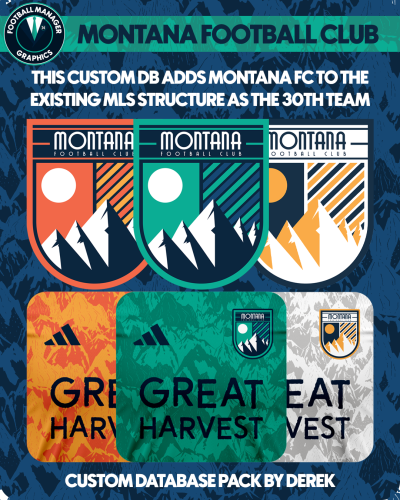
This custom database by Football Manager Graphics sees the MLS add a 30th team in Montana Football Club.
New owner James Pallotta brings in experienced Chairperson Bruce Buck and Director of Football Massimo Taibi to run the football operations while the playing side is led by Montana captain David De Gea.
Key Players
David De Gea
Douglas Costa
Mamadou Sakho
Jesse Lingard
Yann M'Vila
Rodrigo Caio
Mix Diskerud
Josef Martinez
This database also includes the team logo in 11 styles and kits in 4 styles.
Alternative options are also available.
Installation Instructions
Download the custom database and extract the folder.
Place the fmf file in the directory below.
Sports Interactive->Football Manager 2024->editor data
Place the graphics folder in the directory below.
Sports Interactive->Football Manager 2024->graphics
Start a new game and select database. Ensure Montana Football Club is selected.
Then, select the MLS before choosing Montana Football Club from the Eastern Conference.
- 93 Downloads
- 3 Comments
Updated -
FM Mobile FMG Logos 2025.02
Pack and Template by @Derek
Research Team
@schweigi @AndreaSSL1900 @cameosis @Markitos @Scy @ateesz @inohcanoss @rioplworks @wfm18 @Lavegaks @Kriss @NassFas @Moondog777
Pack Contents
Each pack consists of official logos which we referred to as 'Normal' logos. We offer 'Alternative' logos in each of our packs which are logos that clubs may wear as shirt logos, perhaps in different colours, anniversary editions but are all based on official logos used by that organisation.
We've also added 'Fantasy" logos to the packs which are great for future saves and 'Create-A-Club' games. In fact, all the logos created in our Design Factory are included in the megapacks. We have also got an option for the 'Retro' fans with a great selection of historic logos from many teams and competitions.
Each pack also contains our very own default minimal style for those logos we haven't yet covered. However, if you wish to stick with the original default logos from the FM series simply delete our version in the megapack and unzip 'Original Default Logos' file.
Installation Guide - FMG Monthly Logo Updates
Drag and drop the contents (including the config files) of each folder in this update pack into the corresponding folder in the megapack and replace the existing logos when prompted. Do not drag and drop the actual folders as this will overwrite your megapack.
This MUST be done for all three sizes (512x512px, 50x36px and 25x18px) or you will have issues displaying the logos in-game.
Then simply go to preferences in FM and reload your skin.
Alternative | Fantasy | Retro Logos
To use any of the alternative, fantasy or retro logos in game you must remove the text at the end of each logo i.e. alt, retro or fantasy and drag and drop into the normal logo folder in the megapack.
You will need to repeat this for all four sizes. Then simply go to preferences in FM and reload your skin.
I would advise creating a copy of the original logos before replacing them.
- fmg
- fm25
- fm25 logos
- fm25 graphics
-
Tagged with:
- fmg
- fm25
- fm25 logos
- fm25 graphics
- fm25 mobile
- fm25 mobile graphics
- fm25 mobile logos
- fm mobile logos
- fm mobile graphics
- fm mobile
- fmg logos
- fmg logos megapack
- fmg logos updates
- football manager
- football manager logos
- football manager 2025
- football manager 2025 logos
- football manager 2025 graphics
- football manager graphics
- football manager 25
- 24 Downloads
Updated -
FMG Logos 2025.02
Pack and Template by @Derek
Research Team
@schweigi @AndreaSSL1900 @cameosis @Markitos @Scy @ateesz @inohcanoss @rioplworks @wfm18 @Lavegaks @Kriss @NassFas @Moondog777
Pack Contents
Each pack consists of official logos which we referred to as 'Normal' logos. We offer 'Alternative' logos in each of our packs which are logos that clubs may wear as shirt logos, perhaps in different colours, anniversary editions but are all based on official logos used by that organisation.
We've also added 'Fantasy" logos to the packs which are great for future saves and 'Create-A-Club' games. In fact, all the logos created in our Design Factory are included in the megapacks. We have also got an option for the 'Retro' fans with a great selection of historic logos from many teams and competitions.
Each pack also contains our very own default minimal style for those logos we haven't yet covered. However, if you wish to stick with the original default logos from the FM series simply delete our version in the megapack and unzip 'Original Default Logos' file.
Installation Guide - FMG Monthly Logo Updates
Drag and drop the contents (including the config files) of each folder in this update pack into the corresponding folder in the megapack and replace the existing logos when prompted. Do not drag and drop the actual folders as this will overwrite your megapack.
This MUST be done for all three sizes (512x512px, 50x36px and 25x18px) or you will have issues displaying the logos in-game.
Then simply go to preferences in FM and reload your skin.
Alternative | Fantasy | Retro Logos
To use any of the alternative, fantasy or retro logos in game you must remove the text at the end of each logo i.e. alt, retro or fantasy and drag and drop into the normal logo folder in the megapack.
You will need to repeat this for all four sizes. Then simply go to preferences in FM and reload your skin.
I would advise creating a copy of the original logos before replacing them.
- 1,528 Downloads
Updated