






Derek
Administrators
-
Joined
-
Last visited
Everything posted by Derek
-
Thanks mateInclude the circle or not?Thanks guys great work!FMG Grunge Flags for Football Manager 2022
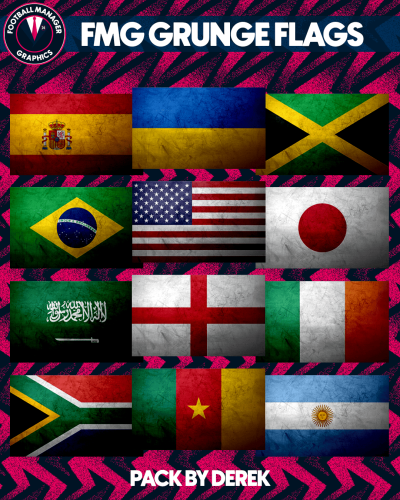 FMG Grunge Flags for FM22🤣 Skintsea. Looks like it's going to be a relegation battle. Hopefully yours works out better than my last one.Brilliant! Hows the team looking? Any current Saints players still knocking about?Hi Guys The bug which was preventing users from logging in has now been fixed. Sorry for any inconvenience this has caused.😮 Really you changed? 😀Steel Logos Update 3 Update 2022.03 Clubs: 807 Competitions: 78 Flags: 4 Nations: 4 Total: 893 Thank you to all the research team as always for their valuable help. Note: It’s important to copy the content only from each folder and paste into the corresponding folders in the megapack. Do not copy and paste the actual folders.FMG Logos Update 3 Update 2022.03 Clubs: 807 Competitions: 78 Flags: 4 Nations: 4 Total: 893 Thank you to all the research team as always for their valuable help. Note: It’s important to copy the content only from each folder and paste into the corresponding folders in the megapack. Do not copy and paste the actual folders.TPU Logos Update 3 Update 2022.03 Clubs: 807 Competitions: 78 Flags: 4 Nations: 4 Total: 893 Thank you to all the research team as always for their valuable help. Note: It’s important to copy the content only from each folder and paste into the corresponding folders in the megapack. Do not copy and paste the actual folders.ING Logos Update 1 Update 2022.03 Clubs: 807 Competitions: 78 Flags: 4 Nations: 4 Total: 893 Thank you to all the research team as always for their valuable help. Note: It’s important to copy the content only from each folder and paste into the corresponding folders in the megapack. Do not copy and paste the actual folders.FMV Logos Update 2 Update 2022.03 Clubs: 807 Competitions: 78 Flags: 4 Nations: 4 Total: 893 Thank you to all the research team as always for their valuable help. Note: It’s important to copy the content only from each folder and paste into the corresponding folders in the megapack. Do not copy and paste the actual folders.FMG Standard Logos Update 3 Update 2022.03 Clubs: 807 Competitions: 78 Flags: 4 Nations: 4 Total: 893 Thank you to all the research team as always for their valuable help. Note: It’s important to copy the content only from each folder and paste into the corresponding folders in the megapack. Do not copy and paste the actual folders.Stone Logos Update 3 Update 2022.03 Clubs: 807 Competitions: 78 Flags: 4 Nations: 4 Total: 893 Thank you to all the research team as always for their valuable help. Note: It’s important to copy the content only from each folder and paste into the corresponding folders in the megapack. Do not copy and paste the actual folders.




Important Information
Terms & Conditions
Account
Navigation
Search
Configure browser push notifications
Chrome (Android)
- Tap the lock icon next to the address bar.
- Tap Permissions → Notifications.
- Adjust your preference.
Chrome (Desktop)
- Click the padlock icon in the address bar.
- Select Site settings.
- Find Notifications and adjust your preference.
Safari (iOS 16.4+)
- Ensure the site is installed via Add to Home Screen.
- Open Settings App → Notifications.
- Find your app name and adjust your preference.
Safari (macOS)
- Go to Safari → Preferences.
- Click the Websites tab.
- Select Notifications in the sidebar.
- Find this website and adjust your preference.
Edge (Android)
- Tap the lock icon next to the address bar.
- Tap Permissions.
- Find Notifications and adjust your preference.
Edge (Desktop)
- Click the padlock icon in the address bar.
- Click Permissions for this site.
- Find Notifications and adjust your preference.
Firefox (Android)
- Go to Settings → Site permissions.
- Tap Notifications.
- Find this site in the list and adjust your preference.
Firefox (Desktop)
- Open Firefox Settings.
- Search for Notifications.
- Find this site in the list and adjust your preference.