Football Manager 2026 Skins
3 files
-
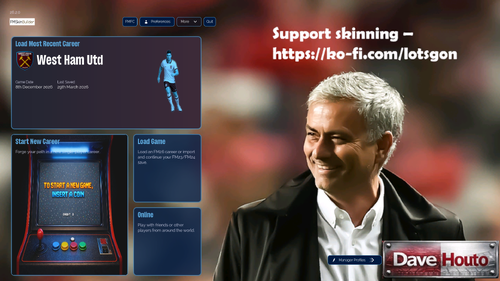
TSO FM26 skin version 4.2.1
Supported Platforms: Windows and macOS(untested)
I’ve gone back to a darker blue theme as this seems to be one of the best that show off the changes. A lot of the changes are due to the fantastic skinning community, see the credits section below for links to the Discord and the brilliant people that help put a new spin on the game to make the experience 1000% better.
Update includes:
Colour theme change
Matchday scoreboard moved to the left-hand side
Matchday shirts changes to player images
Tile changes
Scrollable tile with buttons to change tile data
Installation
Extract the bundle files into your game installation folder (replace the existing files when prompted).
Windows:
Steam: \Steam\steamapps\common\Football Manager 26\fm_Data\StreamingAssets\aa\StandaloneWindows64
Xbox Game Pass: \XboxGames\Football Manager 26\Content\fm_Data\StreamingAssets\aa\StandaloneWindows64
Epic: \Epic Games\Football Manager 26\fm_Data\StreamingAssets\aa\StandaloneWindows64
macOS:
Right-click the Football Manager app → Show Package Contents.
Then navigate to the bundles folder using a similar path structure as above Content → Resources → Data → StreamingAssets → aa → StandaloneOSX).
Paste and replace the supplied bundles.
Fire up FM26 and enjoy
Credits
Everybody on the FM Skin Builder Discord to which I’m forever in debt to. These guys put a lot of effort into skinning and helping people like me put something together that hopefully brings joy to whoever uses my skin. I would like to thank the below in particular.
Tom
xxx Darkside xxx
Lucky Luke
MW90
Please support skinning at - https://ko-fi.com/lotsgon.
https://discord.com/channels/1338139048979595344/1466024246668038157
https://discord.com/channels/1338139048979595344/1449826223390851236- 25 Downloads
- 2 Comments
Updated -
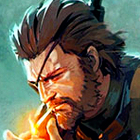
The Material Skin is ready for you again this year!
It's based on the colors of the skin created for previous editions of the game, with the addition of a couple of custom backgrounds. For now, this version is based on the game still in beta, so there may be structural issues unrelated to the skin.
I hope you like it, and if you'd like to support my work, I'd be very grateful. 🙂
If you'd like information on how to change any colors, DM me and I'll try to help you as much as I can. 🙂
Cheers
To use the default attribute colors go to preferences -> details -> audio and video and choose preset 3 on "player attributes"
Thanks to Darkside for the default skin and to all the other mods for their contributions to the community!
v2.1.0
- Fixed everything after update
- Fixed picture staff overlapping text
- Resized some fonts (match commentary, attribute name etc)
- Fixed some bg button that was too bright and no readeble (button make offers, button in prematch press conference etc)
v2.0.1
- Fixed everything after hotfix
- Resized some fonts
v2.0
- Fixed everything after update break all
- Redesigned some screens using FM Skin Builder
- Changed fonts
v1.2
- Fixed everything after update break all
v1.1
- Fixed everything after update break all
v1.0
- Fixed everything after update break all
- Added colors of number sub in the prematch pitch
- Removed circle background from player (maybe not everywhere)
- Removed gradient for player, no player, retired player (read the instructions in the file you download because I also included a version that restores the gradients for those who like it)
v0.7
- Fixed everything after update break all
- Removed, for now, colors of number sub in the prematch pitch (i need find a way to restore it because they change the code of that files)
v0.6.1
- Fixed crash on tactics screen when you a role without player assigned
- Fixed crash when ask agent about teams that are interested in player
- Fixed crash on Data hub on Mac (it should not be)
v0.6
- Fixed recrutiment highlighted search by role
- Fixed press conference pre-match
- Fixed preference menu
- Added Mac compatibility
v0.5.1
- Fixed crash on match screen
- Fixed press conference journalist
- For Mac version removed for now the 2 file causing issue but i can't test now and i hope should work
v0.5
- Added Mac compatibility
v0.4
- Fix color label trendy in inbox message
- Fix bg number popup search result
- Fix circle end graphics total income in finance income popup
- Fix number in nxgn for list player
- Fix calendar purple in processing panel
- Fix circle this month total income in finance income popup
- Fix circle this month total expenditure in finance income popup
- Fix border bottom tab income breakdown tab
- Fix border bottom tab expenditure breakdown tab
- Fix bg opposite team news prematch
- Fix pitch lineup prematch
- Fix bg staff advice prematch
- Fix bg top card offer player
- Fix color label CL, EL, Conference in league table
- Fix color of current transfer budget cost text
- Removed gradient bg of transfer budget cost text
v0.3
- Fix everything after update break all
v0.2
- Fix colour circle news unread
- Fix color icon news
- Fix color must respond button
- Fix color icon and sub number in pre-match table
- Removed green bars in tactic panel
- Added new pitch for pre-match
- Fix color league table in pre-match
- Added file for default color attributes and instruction file
Extract the contents of the downloaded file.
Download the file.
Unzip the file.
Locate the Game Directory: Navigate to your Football Manager installation directory.
The standard path for Windows is typically:
\Steam\steamapps\common\Football Manager 26\fm_Data\StreamingAssets\aa\StandaloneWindows64\
And for Mac:
~/Library/Application Support/Steam/steamapps/common/Football Manager 26/fm.app/Contents/Resources/Data/StreamingAssets/aa/StandaloneOSX
Locate the original files (SEE ABOVE) in the game's data folder and make a backup copy before proceeding.
Copy and paste the files into the game directory. When asked, choose to overwrite/replace the existing files.
DONATION
https://paypal.me/manuelalterio
material-skin-26-v2.1.rar- 543 Downloads
Updated -
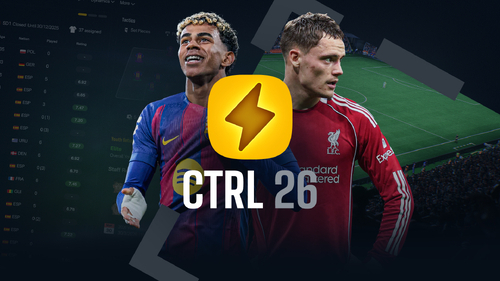
CTRL is a custom skin for FM26 by MW90. Built and maintained using FM Skin Builder.
Supported FM version: 26.1.3 Hotfix
Supported Platform: Windows and macOS
Installation
Extract the bundle files into your game installation folder (replace the existing files when prompted).
Windows:
Steam: \Steam\steamapps\common\Football Manager 26\fm_Data\StreamingAssets\aa\StandaloneWindows64
Xbox Game Pass: \XboxGames\Football Manager 26\Content\fm_Data\StreamingAssets\aa\StandaloneWindows64
Epic: \Epic Games\Football Manager 26\fm_Data\StreamingAssets\aa\StandaloneWindows64
macOS:
Right-click the Football Manager app → Show Package Contents.
Then navigate to the bundles folder using a similar path structure as above (Content → Resources → Data → StreamingAssets → aa → StandaloneOSX).
Paste and replace the supplied bundles.
Repository (source files, for personal use with FM Skin Builder): https://github.com/matt-wadsworth/ctrl-fm
Thanks to lotsgon, Darkside, (sic), MrTini23 and everyone else working to improve the FM skinning experience.
Notes
Recommended for 1920x1080 and above, with Small font size scaling. May work with other setups but this isn't tested.
Same for languages, tested and built in English, other languages may have issues.
Changelog
[1.1.1] – 26-02-2026
Fixed
Individual Training - Fixed a bug preventing Praise/Criticise actions from showing.
[1.1] – 25-02-2026
Added
Pros and Cons – Added to Player Reports.
Match View - Added Pass Maps.
Individual Training - New tile layout.
Player Reports - New tile layouts for Overview, Performance and Career tabs.
Changed
Key/Preferred attribute highlights – Made these more obvious (may still tweak; want to keep them quite subtle).
Match View - Re-arranged tiles and updated Commentary Bar styling.
Switches - Updated styling.
Font - Removed replacement of language fonts.
Club Site - Added more relevant info - based on MrTini/WTS layouts.
Checkboxes - Updated styling.
Messages Unread Indicator - Increased contrast.
Fixed
Player Polygon – Fixed for goalkeepers.
Warning Icon - Reverted to white icon to make it visible on Continue/Must Respond buttons.
Background Replacement - Fixed for Bundesliga and added others in case another league was missed.
Incoming Messages - Removed blue background.
[1.0] – 20-02-2026
Initial release of the CTRL skin.
- 196 Downloads
Updated